The Better Marketing Blog
Better tips, tools, and tactics for the AI era.
Better tips, tools, and tactics for the AI era.

We’ve been doing SEO since the mid-1990s, when Google was just a baby. We’ve seen many SEO reports from both our own team and outside agencies, and we’ve learned that good monthly SEO reports tell leadership four things:
Most SEO reports overdo it on the keyword and technical data. Instead, focus on telling a story: lead with results such as visits from potential customers, conversions, and high-value searches. Keep detailed data in supporting sections.
This article will follow a marketing manager as she uses Google Search Console, GA4, and AI marketing tools to build her monthly SEO report. You’ll find a complete example and prompts you can adapt along the way.
Maya is a marketing manager at a fictional B2B compliance software company. She begins her monthly report with 12 charts covering impressions, backlinks, domain authority, and average position.
Her CMO’s first question is always the same: “So, did this generate any business?”
For September, Maya brings together Search Console results, on-site behavior, and demo requests. Before drafting her summary, she needs to check what she can confidently say about the results.
Your executive summary should answer four questions:
Google recommends using Search Console for search performance and Google Analytics for on-site behavior. The numbers will rarely match exactly because clicks and sessions use different measurement systems, so compare their overall trends rather than forcing identical totals.
A useful executive-summary format is:

Prompt: Turn SEO exports into an executive summary.
Upload: Current and previous-month Google Search Console exports, GA4 landing-page export, conversion report, and SEO activity log.
You are a senior SEO strategist preparing a monthly report for business leadership.
Analyze the attached Search Console, GA4, conversion, and activity-log files for [MONTH AND YEAR].
Identify:
Prioritize qualified organic traffic, leads, revenue, signups, and visibility for commercially valuable non-branded topics. Use rankings as supporting evidence.
Treat timing and page-level changes as evidence to investigate. Claim causality only when the analysis addresses other plausible explanations; otherwise label the explanation as a hypothesis.
Output:
Maya’s September data shows that organic sessions rose 18%, while demo requests increased from 36 to 47. She includes both figures because more traffic doesn’t automatically mean more demo requests.
Then she checks which pages brought in the additional clicks and where rankings improved. She also separates searches that include the company’s name from non-branded searches, which don’t. That helps her see whether more people are finding the company without already knowing its name.
Google advises focusing more heavily on trends in clicks and impressions than on average position alone. Average position tells you where your site’s highest result appeared, on average. That overall figure can hide important differences between searches, pages, devices, and locations.
Build your SEO reporting around this hierarchy:
| Reporting level | Metrics to include |
|---|---|
| Business outcomes | Leads, revenue, trials, purchases, conversion rate |
| Traffic outcomes | Organic sessions, Search Console clicks, engaged sessions |
| Visibility drivers | Impressions, click-through rate (CTR), non-branded query growth, priority-page rankings |
| Supporting work | Published content, refreshed pages, resolved indexing issues, earned links |
| Next actions | Prioritized opportunities, owner, expected outcome |
Limit the main scorecard to five or six metrics. Give every metric a comparison: month over month, year over year, against target, or all three.
Your SEO report should also explain the comparison period. Seasonal businesses can show healthy year-over-year growth alongside a month-over-month decline. Google recommends comparing similar periods and reviewing longer timeframes when seasonality may influence performance.
Follow-up prompt: Select the scorecard metrics
Continue in the same AI conversation. Add your business goals and definitions of qualified leads or conversions, then prompt:
Select up to six metrics for this report. Show current values, month-over-month changes, and year-over-year comparisons where available. Explain each metric’s relevance to our goals and flag tracking changes, seasonality, or incomplete data that affect interpretation.
With her scorecard selected, Maya looks more closely at the pages and searches behind September’s growth. She finds gains among existing comparison pages and a guide that now appears in search. She also notices that the homepage’s clickthrough rate has fallen.
Here’s the report she builds for leadership.
Organic search generated 47 demo requests in September 2026, up 31% from August, while organic sessions increased 18%. Search Console shows click gains for compliance software comparison pages and a newly ranking guide to vendor risk assessments, though the available data doesn’t fully explain the increase.
Next month, we recommend updating three pages currently ranking between positions 5 and 12, which together receive more than 26,000 monthly impressions.
| Metric | August 2026 | September 2026 | Change |
|---|---|---|---|
| Organic sessions | 18,240 | 21,523 | +18% |
| Google Search clicks | 15,810 | 18,390 | +16% |
| Organic demo requests | 36 | 47 | +31% |
| Organic session-to-demo rate | 0.20% | 0.22% | +10% |
| Non-branded clicks | 8,420 | 10,610 | +26% |
| Priority keywords in top 10 | 74 | 89 | +20% |
The share of organic sessions that led to a demo request rose from about 0.20% to 0.22%. We still need to check whether those requests came from prospects who are a good fit for the business.
We could classify 1,600 of September’s 2,580 additional clicks. Searches where our pages ranked higher accounted for 980, while search-and-page combinations absent from the previous export added 620. The export doesn’t give us enough information to explain the remaining increase.
Within that group, 61% of the additional clicks came from searches where our pages ranked higher, and 39% came from newly visible search-and-page combinations.
A refreshed comparison page moved from position 11 to position 5 for its primary non-branded query. Clicks increased 82%, and the page generated seven demo requests.
Homepage impressions increased 24%, but CTR declined from 5.1% to 4.3%. Compare branded and non-branded search performance before changing the homepage title or description.
Update the three high-intent pages ranking in positions 5–12. Improve their answers to comparison, pricing, and implementation questions, then strengthen internal links from high-authority pages.
To check which pages and queries contributed to the changes in Maya’s report, sort Search Console comparisons by click difference. The prompt below helps classify those gains and flag records that need closer review.
Prompt: Separate gains from new and improved rankings.
Upload: Search Console query-and-page exports for the current and previous reporting periods.
You are an SEO data analyst.
Compare the attached Search Console exports for [CURRENT PERIOD] and [PREVIOUS PERIOD]. Match records using both query and landing page where possible.
Classify positive click growth as:
Assign each record to one category only; use Unclassified when drivers overlap or the evidence is insufficient. Calculate each category’s share of total positive click growth, including unclassified gains in the denominator. Separately reconcile positive gains and losses with the net click change in the scorecard. If exports cover only a subset, state its size and report any subset percentages with an explicit denominator.
Return:
Maya puts the three page updates first because those pages already appear in searches potential buyers make. The homepage needs investigation before the team commits to a change. Her action plan separates work they can start now from questions they still need to answer.
For findings that warrant action, compare business value, potential impact, confidence in the evidence, and effort, a practical prioritization formula is:
Priority = business value × potential impact × confidence ÷ effort
Your action table can stay simple:
| Priority | Action | Evidence | Owner | Timing |
|---|---|---|---|---|
| 1 | Update three position 5–12 pages | 26,000 impressions; high commercial intent | Content | October |
| 2 | Investigate homepage CTR decline | CTR down 0.8 percentage points; segment queries | SEO | October |
| 3 | Add internal links to new guide | Ranking at position 14; conversions above average | SEO/content | October |
Follow-up prompt: Prioritize next month’s work
Add the draft report, content inventory, and team capacity to the same conversation, then ask:
Use the prioritization formula above to recommend up to five actions for the next 30 days. Score each factor from 1–5. For each action, include the evidence, expected outcome, owner, estimated effort, and how and when we’ll measure progress. Distinguish work we can begin now from findings that need investigation.
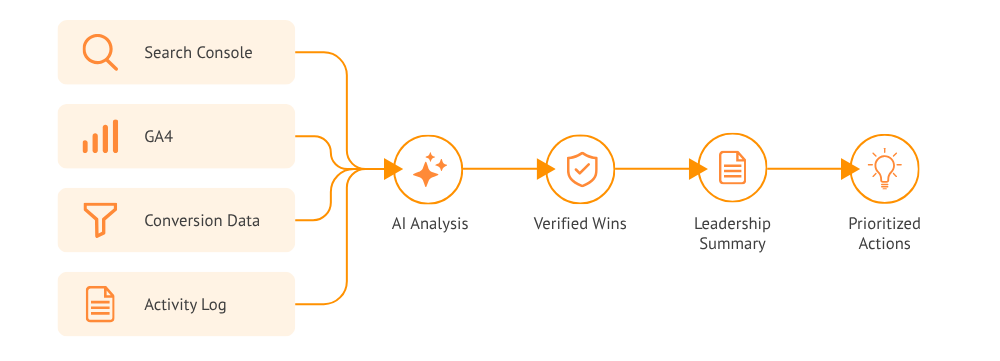
The prompts above can turn separate exports into a useful monthly SEO report. The process still requires marketers to upload files, explain business priorities, reconcile metrics, and repeat the analysis every month.
Media Shower builds that context into an ongoing marketing intelligence system customized for your business.
Our platform connects your SEO performance with site behavior, conversion data, content history, buyers, and brand strategy. Each week, it identifies meaningful changes, explains likely drivers, and prioritizes the next actions.
And as the system gets more performance history, your recommendations get even better.
Give leadership SEO wins worth sharing, and your team clear next steps. Turn your marketing data into actionable intelligence with a free Media Shower trial.
Show what’s been completed, which pages or searches you’re monitoring, and when you’ll review performance. Keep that work separate from measured wins. If results haven’t appeared, say so; publishing or updating a page doesn’t establish that it’s improving performance.
Mark the date and explain which metrics are affected. A tracking change can make conversions rise or fall without a matching change in customer behavior. Avoid a direct before-and-after comparison unless the measurement is consistent, and use the first complete period under the new setup as your baseline.
Media Shower automatically turns SEO, GA4, and AI visibility data into clear, prioritized recommendations. Instead of manually building reports or interpreting dashboards, marketers get consistent insights into what changed, why it matters, and what to do next—with reporting that becomes more tailored over time.
Start your free Media Shower trial and get personalized insights on your SEO, competitors, AI visibility, and what to do next.