The Better Marketing Blog
Better tips, tools, and tactics for the AI era.
The Better Marketing Blog
Better tips, tools, and tactics for the AI era.

Your website’s organic traffic has dropped. Is it because of declining Google rankings, stronger competitors, technical problems, or something else?
Instead of spending hours digging through reports, you can use AI to investigate the problem and recommend what to do next.
Here’s how to diagnose an organic traffic drop in four steps.
Start by identifying when traffic declined and which pages and keywords were most affected.
Install a browser plugin like Claude for Chrome or ChatGPT for Chrome and use the prompt below to have it pull this data automatically.
Analyze My Organic Traffic Drop
Open Browser tabs with Google Analytics 4 and Google Search Console.
Visit Google Analytics 4 and Google Search Console for [WEBSITE URL].
Compare organic search performance over the past three complete months with the previous three months and the same period last year.
Tell me:
Summarize the biggest losses in a simple table.
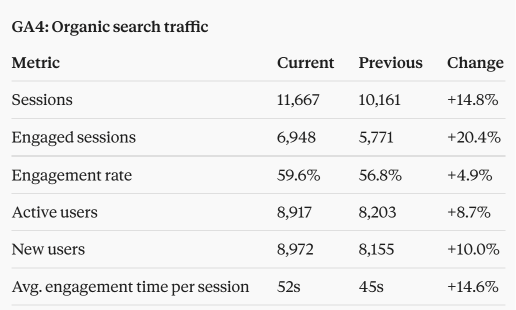
Sample results generated in Claude using these instructions.
Once you know where traffic declined, the next step is understanding why.
Common causes include lower search demand, declining Google rankings, stronger competitors, technical website problems, or changes to Google’s search results.
Diagnose My SEO Traffic Losses
Context Previously gathered organic search performance data.
Using the data we’ve gathered, investigate the most likely reasons for our traffic decline.
Look for changes in rankings, search impressions, click-through rates, and any technical problems that might explain the losses.
For our most important declining pages, compare our content with pages currently ranking above us.
Explain the likely causes in plain English. Distinguish what the data confirms from what still needs investigation.
Not every traffic decline requires action. Some keywords are seasonal, and some lost visitors may never have been potential customers.
Focus on problems that affect your most valuable pages and offer a realistic opportunity for improvement.
Recommend SEO Fixes
Context Completed traffic analysis from the previous steps.
Based on our traffic analysis, recommend the five most important actions we should take to recover organic traffic.
Prioritize fixes that could have the greatest impact on qualified visitors and conversions.
For each recommendation, explain what needs to change, why it matters, and how difficult it would be to implement.
Present the results in a simple table.
After making changes, monitor your results to see whether they’re working.
Use Google Search Console to track changes in rankings, impressions, and clicks. Use GA4 to see whether organic traffic and conversions improve.
Review the results monthly, recognizing that some SEO improvements may take weeks or months to show results.
Check My SEO Recovery
Context The original data from Step 1 (recorded before your changes), plus the new data from Step 1 (rerun a few weeks after your changes).
Compare our current SEO performance with the baseline we established before making changes.
Which pages and keywords have recovered? Which are still declining?
Summarize what’s improved, what hasn’t, and what we should do next.
Media Shower’s AI marketing platform helps identify SEO problems and opportunities by analyzing search performance, competitors, and your business context.
Instead of manually investigating every traffic change, you can get prioritized findings and recommendations that help your team focus on what matters.
Sign up for a free trial here.
Start investigating as soon as the decline is large enough to affect forecasts or conversions. Check several days of data before treating a one-day movement as a trend, unless the loss is sudden and severe.
A sharp sitewide collapse deserves immediate technical checks; a smaller fluctuation may require a longer comparison period.
Check both. Search Console helps explain changes in Google impressions, clicks, CTR, queries, and positions. GA4 shows landing-page sessions, engagement, conversions, and revenue after the visit.
Search Console is usually the stronger starting point for diagnosing search visibility, while GA4 establishes business impact.
It can, but timing alone provides weak evidence. Determine which pages and queries declined, inspect technical changes, compare demand, and review competing results. An update may coincide with seasonality, website releases, or competitor improvements.
Possible causes include analytics-tag problems, consent changes, landing-page errors, redirects, differences in attribution, or normal discrepancies between the platforms.
Compare the start date with analytics releases and test the affected landing pages before changing SEO content.
Lead with what was lost, the business impact, and what the team needs to approve. Use the monthly SEO reporting example to put the recovery plan in context.
Start your free Media Shower trial and get personalized insights on your SEO, competitors, AI visibility, and what to do next.