The Better Marketing Blog
Better tips, tools, and tactics for the AI era.
Better tips, tools, and tactics for the AI era.

Marketing campaigns demand fresh copy, multiple ad variations, social posts, landing pages, and more—often on tight deadlines. Google AI Studio is built to handle that pressure. This no-code platform lets marketers generate multi-format campaign assets, test creative variations, and automate repetitive tasks without needing a technical degree.
If you’re new to AI or looking for a tool that integrates seamlessly with your existing Google ecosystem, AI Studio is worth your attention. Here’s what it does, how it works, and why it matters for your marketing workflow.
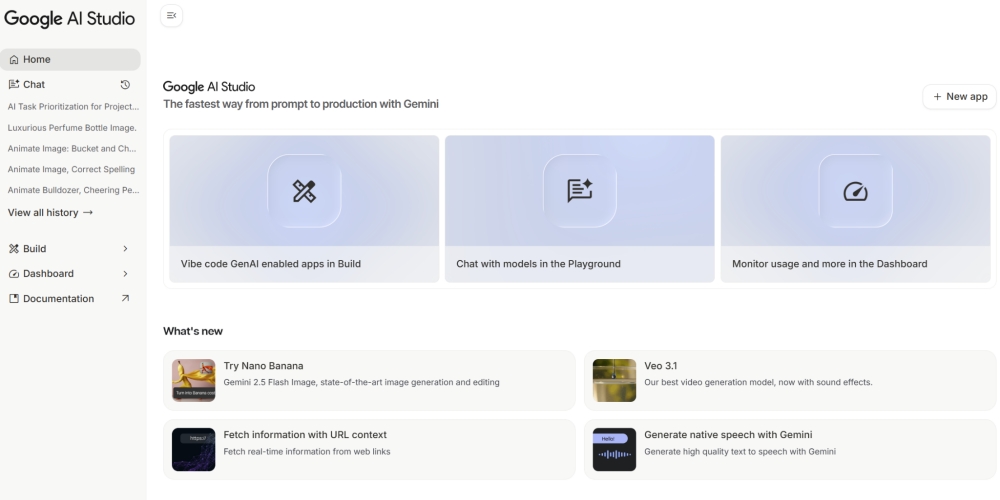
Google AI Studio is a browser-based platform that gives marketers direct access to Google’s Gemini AI models along with multimedia and app-building capabilities. There’s no complex setup, and you don’t need to know how to code.
The platform offers a family of specialized models, each designed for different marketing challenges:
Gemini 2.5 Flash handles your daily written tasks—social posts, ad headlines, email drafts—with speed and efficiency. It’s the workhorse you’ll use most often, designed for quick turnarounds and cost-effective content generation.
Gemini 2.5 Pro steps in when you need sophisticated analysis: detailed competitor research, complex strategy documents, or long-form content requiring deeper reasoning. Think of Pro as your strategic analyst, Flash as your rapid execution engine.
Nano Banana (also known as Gemini 2.5 Flash Image) executes complex image edits through simple text commands. No design software required, just describe the changes you want.
Veo version 3.1 generates professional video content with native audio—including dialogue, sound effects, and ambient sounds—from text prompts or images. Perfect for creating social ads or promotional content without video editing software.
Build lets you create no-code apps and tools.
Best of all, AI Studio gives you a clean interface where you simply describe what you need.
(See our companion guide, Learn How to Create Marketing Videos with Nano Banana and Veo)
You can generate text, analyze documents, create images and videos, and even build simple chatbots, all from one interface.
Think of it as a creative production tool that scales with your needs. Whether you’re drafting a single email, spinning up 50 ad headlines for A/B testing, or creating video content, AI Studio handles it without forcing you to switch between tools.
A look at AI Studio’s integrated workspace.
You can even set up one-click connections to Google Ads or Analytics within the Google ecosystem using the brand-new (experimental) automation program Google Workspace Flows, available through Google Labs.
You can also connect through apps such as Zapier or Make. As still another option, you can connect through the Gemini API if you have technical resources.
Whichever tool you use, this feature will allow you to:
You can also quickly and easily automate multi-step marketing workflows like these:
Google AI Studio excels at specific workflows that marketers face every day. Here’s where it shines.
AI Studio’s extended context window (the amount of information a model can reliably remember at one time) lets you upload a 500-page PDF, request section summaries, then compare findings across different parts—all while maintaining full memory and context.
For marketers working on campaign analysis, competitive research, or multi-document content strategy, this eliminates constantly re-uploading files or repeating information.
Need a blog post, email, and three social captions for the same campaign? AI Studio generates all of them from a single brief. You input your key messages, target audience, and tone, then let the platform produce drafts across formats.
When all your assets come from the same source material, your messaging stays aligned. You spend less time rewriting and more time refining.
AI Studio allows the AI models to “see” the video, rather than just read the audio transcript. The platform offers robust features and can handle long videos for content analysis and repurposing.
Marketers can build powerful apps with Google AI Studio in minutes, which can integrate directly with Google Cloud.
These include:
Most apps can be custom branded and shared with the team or clients at zero cost.
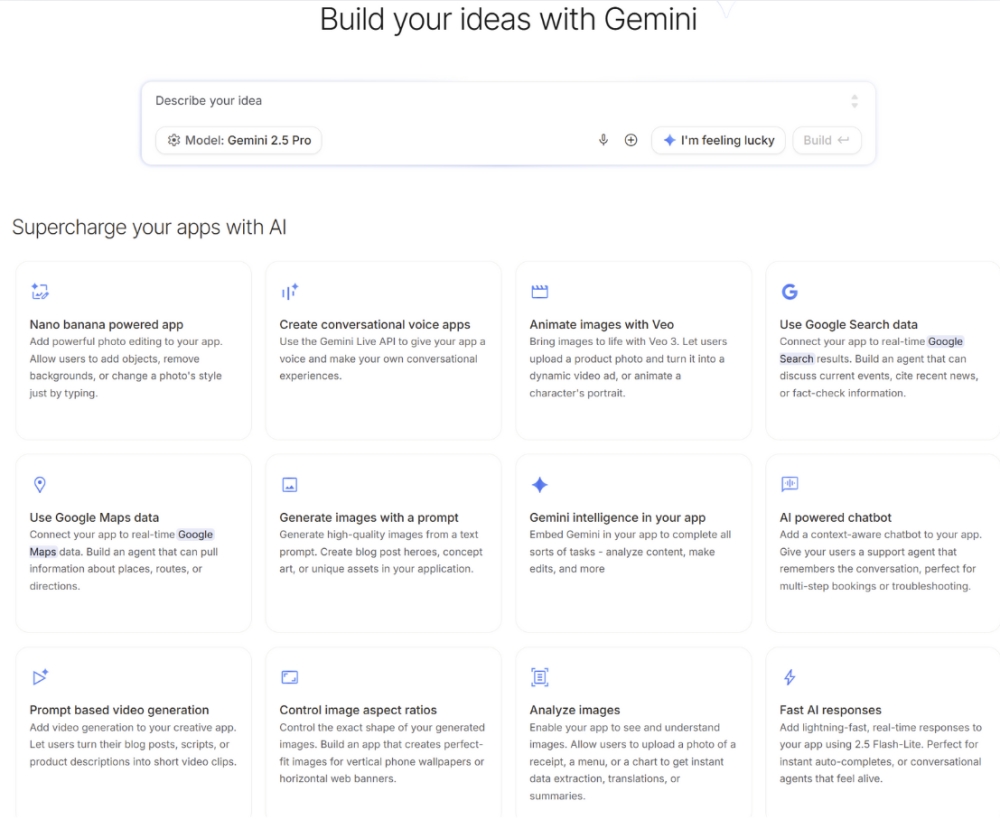
With Google Maps capabilities, you can build apps and campaign tools that access real-time, location-based data. This lets marketers deliver up-to-date local information—like store details, directions, reviews, and targeted offers—automatically tailored to a user’s location or travel plans.
Common use cases:
Google AI Studio connects Gemini models to real-time, publicly available web content via live Google Search queries. Instead of relying exclusively on pre-trained data, it enriches AI responses with current, verifiable information and citations from recent web results.
This lets you deliver more accurate, up-to-date, and trustworthy answers in chatbots, campaign tools, or generative apps, all while visibly referencing sources to build user trust and transparency.
When Google Search grounding is enabled, it automatically formulates search queries, processes results, synthesizes the most relevant facts, and embeds supporting links into its responses.
This feature keeps marketing content fresh, factual, and easily validated by users, which makes it essential for digital campaigns, customer support, and any dynamic, news-sensitive application.
Running a campaign that needs 30 product descriptions or 50 email subject lines? AI Studio’s batch processing feature lets you upload a spreadsheet with your data, then generate content at scale.
You can customize each output based on variables like product name, audience segment, or regional market.
AI Studio lets you set voice guidelines and tone parameters, then generates content that matches. Create templates for different content types—social posts, emails, landing pages—and ensure everything sounds like it came from the same team.
AI Studio can generate dozens of headline variations in seconds. Feed it your core offer, and it will produce headlines with different angles, emotional hooks, and calls to action.
If you’ve set up the automation, you can export those variations directly into Google Ads, set up split tests, and start learning which messages resonate.
Here’s the key difference: ChatGPT is a conversation tool that lives in isolation, while AI Studio is especially useful for marketing workflows inside the Google ecosystem.
The table below is a detailed feature comparison of the two platforms. Because they have different strengths and weaknesses, many marketers use a strategic combination of the two. The generous limits of AI Studio’s free tier make this a cost-effective option for many.
ChatGPT vs. Google AI Studio: Feature Comparison
The best writer for any marketing task depends on the nature of the task. Here’s a look at the strengths of each.
ChatGPT vs. AI Studio: Which is the better writer?
If you’re ready to give AI Studio a try, here’s how you might use the platform to build a complete campaign from scratch.
Write a one-paragraph description of your campaign: target audience, goal, key message, and channels. Paste it into AI Studio and ask for a content plan. The platform will suggest a list of assets you need—blog posts, emails, social posts, ad copy—and outline a timeline.
Ask AI Studio to create 20 headline variations and 10 description options for Google Ads. Once generated, you’ll see an “Export to Google Ads” button at the top of the output. Click it, select your ad account, and AI Studio creates a draft campaign with all your variations already loaded.
From there, you can review and launch directly in Google Ads (if you’ve set up the automation). This step takes about five minutes.
Use the same brief to generate a blog post, email sequence, and social captions. AI Studio will draft everything in one session. You can tweak the tone or adjust the length as needed. For Google Docs export, click the “Send to Docs” button and choose your destination folder.
Prompt AI Studio to generate social graphics or ad images based on your campaign theme. You can specify dimensions (like “1200×628 for Facebook ads”), color schemes, and visual style. The platform will produce options you can download or test directly.
If your campaign includes a landing page, navigate to the Build tab. Describe what you want: “Create a chatbot that asks visitors about their biggest marketing challenge, then recommends one of our three service packages based on their answer.” AI Studio will build the bot and give you an embed code to paste into your landing page HTML.
Because everything was created in one place, your messaging stays consistent and your workflow stays clean. Your blog post is in Docs, your visuals are ready to go, and your social content is ready to schedule.sam
You can work through this entire process in a single afternoon. That’s the speed advantage AI Studio offers.
The quality of your output depends on the quality of your input. Be specific about tone, audience, and format. Instead of “write an email,” say “write a 150-word email to B2B marketers promoting a free webinar on AI tools, using a friendly but professional tone.”
Don’t expect perfection on the first try. Generate a draft, refine it, then ask AI Studio to adjust specific sections. Treat it like working with a junior writer who needs feedback.
Save your best prompts as templates. If you’re regularly creating product descriptions, social posts, or email sequences, templates will speed up future projects and maintain quality. You’ll find the “Save as Template” option in the project menu.
Connect AI Studio to your Google Ads and Analytics accounts from day one (look for the “Connections” section in Settings). The tighter the integration, the smoother your workflow. You’ll also unlock features like performance-based content suggestions.
Just because AI Studio generates content quickly doesn’t mean you should skip testing. Run A/B tests on headlines, try different creative angles, and measure what works. Speed is only valuable if it leads to better results.
AI Studio is free to start: just sign in with your Google account. You can create projects, generate content, and test all the core features without payment.
As you scale up, you may want to upgrade to Gemini Pro, which offers higher limits for a cost of $19.99/month.
If your team generates high volumes of content or using the more advanced Gemini Pro model frequently, you may need to add a paid API key.
The API works as a usage meter: The free tier covers typical marketing team needs, but if you’re running AI Studio intensively across multiple campaigns daily, you may eventually need to transition to pay-as-you-go pricing.
Google provides clear usage dashboards that show when you’re approaching free tier limits, so you won’t get surprised by charges.
Limits on the free tier are very generous; for most small to mid-size marketing teams, the free tier covers months of regular use.

Media Shower’s AI marketing platform is trained on your business, making it even greater than Google. Click here for a free trial.
API (Application Programming Interface): A way for different software applications to communicate with each other. In AI Studio, APIs let you connect the AI capabilities to your own websites, apps, or marketing tools.
API key: A unique code that identifies your account and lets you access AI Studio’s features programmatically. Think of it like a password that your applications use to connect to Google’s AI services.
Batch processing: Running the same operation on many items at once. Instead of generating one product description at a time, you generate 200 simultaneously.
Context window: The amount of text the AI can “remember” and work with at once. A 1 million token context window means the AI can process roughly 1,500 pages of text in a single conversation.
Model: The AI system that generates responses. Different models (like Gemini 2.5 Pro or Gemini 2.0 Flash) have different capabilities, speeds, and costs.
Model tuning: Training an AI model on your specific content so it learns your brand voice and style. You provide examples of your best writing, and the model adjusts to match it.
Prompt: The instructions or questions you give to the AI. A prompt can be a simple question or a detailed set of requirements for what you want the AI to create.
Rate limit: The maximum number of requests you can make to the AI in a given time period. Free tier users might have limits like “15 requests per minute” to ensure fair access for everyone..
Structured prompt: A reusable template with variables you can change. Instead of writing a new prompt each time, you create one template with blank spaces for product name, features, etc., then fill in different values for each use.
System instructions: Persistent rules you set at the beginning of a chat session that apply to every response. These act like a briefing document the AI follows throughout your conversation.
Temperature: A setting that controls how creative or predictable the AI’s responses are. Low temperature (0.0-0.4) produces consistent, factual content. High temperature (0.7-1.0) produces more varied, creative outputs.
Token: A unit of text the AI processes. One token equals roughly 4 characters or 3/4 of a word. Tokens are used to measure costs and context limits.
Start your free Media Shower trial and get personalized insights on your SEO, competitors, AI visibility, and what to do next.