
- AI transforms from buzzword to practical tool in 2026, and starting the year by putting it to work gives teams an immediate advantage
- These 15 bite-sized tasks take 15-60 minutes each and deliver immediate marketing impact
- From content creation to competitor analysis, each task builds your AI literacy and capabilities.
- These tasks are perfect for teams to move beyond AI experimentation into actual implementation, a little at a time.
AI has evolved from emerging technology to essential infrastructure. Your competitors are testing it. Your customers expect it. Your team needs to master it.
Here’s the good news: You don’t need a six-month AI transformation roadmap. You need practical, bite-sized tasks that build confidence and deliver results.
These 15 AI marketing tasks take an hour or less and create immediate value. They’re designed to move you from “we should probably do something with AI” to “here’s what we’re doing with AI.”
While others are still forming AI committees and writing strategy documents, you’ll be generating results.
AI Content and Creation
1. Test AI for repurposing one blog post
Take your highest-performing blog post from 2025. Copy it into ChatGPT, Gemini, or Claude and ask it to create:
- 5 social media posts (LinkedIn, Twitter, Instagram)
- 1 promotional email
- 1 video script
- 3 different headline variations
Compare the AI-generated versions against what you’d create manually. You’ll likely find the AI versions need editing, yet they give you a 10-minute starting point for what used to take an hour.
2. Generate AI images for your next campaign
Stop paying stock photo sites for generic images. Modern AI image generators create custom visuals in seconds.
Choose one upcoming social post or ad. Generate 5-10 variations using ChatGPT 5.2 or Nano Banana.
AI-generated images work particularly well for concept visualization, abstract ideas, and situations where stock photos feel inauthentic. They’re less effective for realistic human photography where AI-generated faces can trigger uncanny valley responses.
You can now A/B test AI images against stock photography and track engagement and conversion differences.
3. Create an AI-powered FAQ document
Your team answers the same questions repeatedly. Let AI organize that knowledge.
Here’s a quick process:
- Gather your product documentation, help articles, and common support tickets. (You may already have all of this saved in a custom GPT, Claude Project, or Gemini Gem.)
- Upload to ChatGPT or Claude (or use your custom AI assistant).
- Ask it to generate comprehensive FAQs organized by topic.
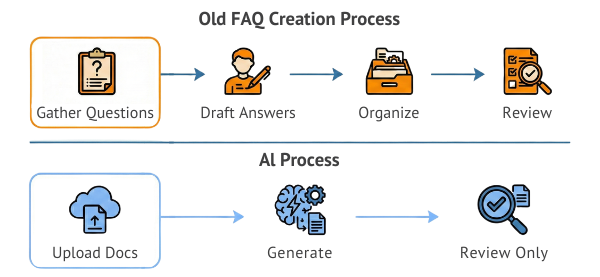
The AI won’t get everything perfect, though it will structure information far faster than manual FAQ creation. Your team’s role shifts from writing to editing and refinement. Have them review for accuracy and brand voice.
You can then publish your FAQ as a resource customers can actually find.
4. Use AI to write 10 email subject line variations
Subject lines make or break email performance. AI generates variations fast enough to test properly.
Here’s your testing framework.
- Give AI your email body copy and target audience.
- Request 10 subject lines with different psychological triggers.
- Test the top 3 against your usual approach.
- Track open rates and click-throughs.
- Refine your AI prompts based on what performs.
AI Analysis and Intelligence
5. Ask AI to analyze your competitor’s positioning
Competitive analysis used to mean hours of manual research. AI does it in minutes.
Here’s a sample analysis process.
- Collect your top 3 competitors’ homepage copy, about pages, and recent blog posts. (Perplexity will make short work of this with a single prompt.)
- Upload to your AI tool. Claude and Perplexity tend to perform best for analytical tasks like this with accurate links to sources, but any AI platform can handle the job.
Prompt: [Ask specific questions like these]:
- “What’s their core value proposition?”
- “Who are they targeting?”
- “What problems do they emphasize?”
- “What differentiators do they claim?”
- “What’s missing from their messaging?”
The AI synthesizes patterns across content faster than human analysis. You still need strategic judgment about how to respond, though the pattern recognition happens instantly.
6. Use AI to identify content gaps
Feed AI your blog titles and your competitors’ blog titles. Ask what topics they’re covering that you’re missing.
Gap analysis questions:
- What keywords appear frequently in competitor content and rarely in yours?
- What customer questions are competitors answering that you’re ignoring?
- What content formats are working for them that you haven’t tried?
- Where do their topics cluster compared to yours?
These questions reveal strategic blind spots. You might discover entire topic categories you’ve overlooked or realize your content focuses on features while competitors emphasize outcomes.
7. Generate customer persona updates with AI
Your customer persona work was probably done in the Clinton administration. AI helps refresh them based on current customer data.
Your persona update process could look like this:
- Export customer data: demographics, purchase patterns, support tickets, survey responses.
- Upload to AI (anonymized for privacy).
Prompt: Please identify:
- Common behavior patterns
- Shared pain points
- Decision-making factors
- Communication preferences
- Unexpected segments
AI excels at spotting patterns in large datasets that humans miss. It might reveal micro-segments worth targeting or show that your assumed personas don’t match actual customer behavior.
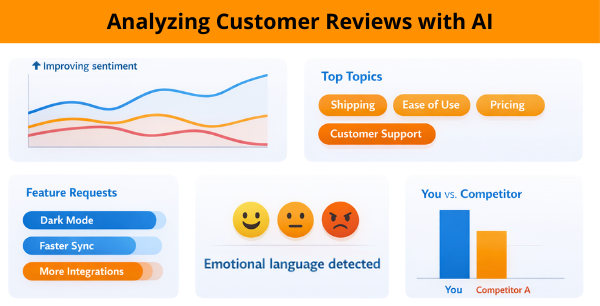
8. Run AI sentiment analysis on customer reviews
Reading hundreds of reviews manually is exhausting. AI extracts themes and sentiment at scale.
Here’s what to analyze:
- Overall sentiment trends over time
- Most frequent complaints and compliments
- Feature requests that appear repeatedly
- Emotional language patterns
- Comparison mentions (you vs. competitors)
Upload your last 100 reviews to ChatGPT or use specialized sentiment tools like MonkeyLearn. The AI identifies patterns that inform product development, marketing messaging, and customer service priorities.
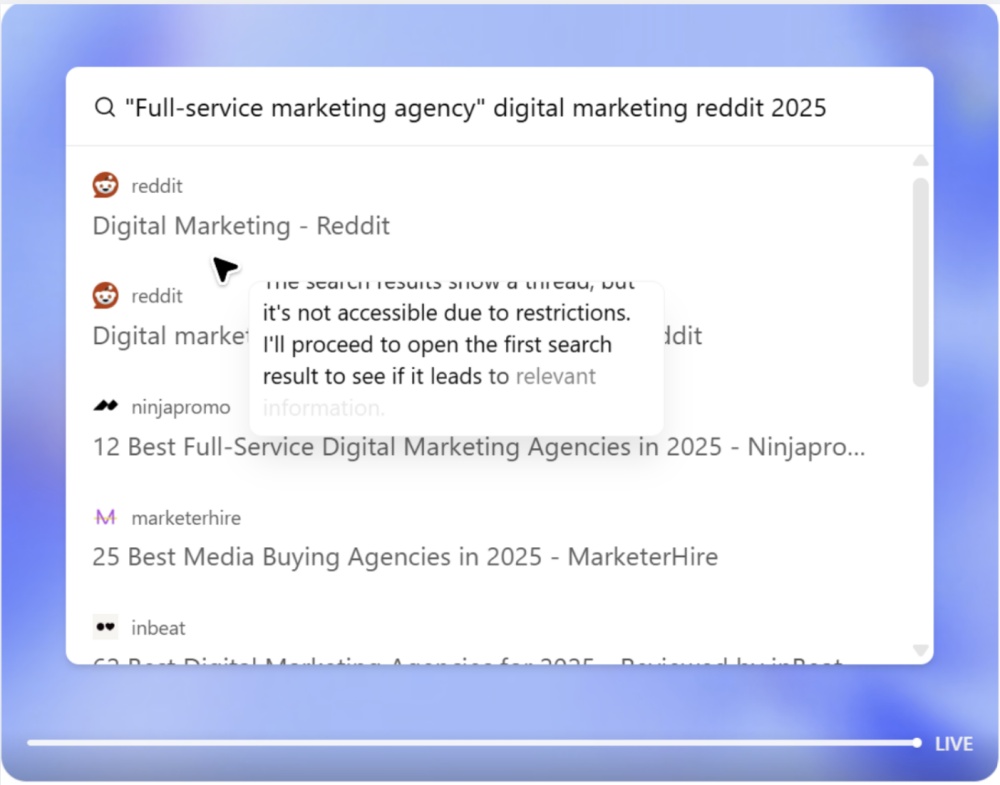
Even faster: Open Perplexity Comet. Open a tab for each of the major review sites in your industry. Then ask Perplexity to research and categorize them all with a single prompt.
AI Automation and Efficiency
9. Set up AI-powered social media monitoring
Stop manually searching for brand mentions. AI tools monitor automatically and surface what matters.
Monitoring setup:
- Configure alerts for brand name variations and common misspellings.
- Track product names and key executives.
- Monitor competitor mentions for market intelligence.
- Set up sentiment alerts for negative spikes.
- Create an automated task in Gemini to create weekly summary reports and email them to you.
Tools like Brandwatch or Mention.com use AI to separate signal from noise. You see conversations that require response without wading through every irrelevant mention.
If you’re unsure how to complete these tasks, just ask your AI tool and it will guide you through, step by step.
10. Test AI for email personalization
Generic batch emails are dead. AI enables true 1:1 personalization at scale:
- Dynamic content blocks based on past behavior
- Send time optimization per recipient
- Subject line variation by segment
- Product recommendations based on browsing history
- Content ordering based on predicted interest
Modern email platforms with AI integration can automatically personalize elements without your team having to manually create dozens of versions. Test AI personalization on one campaign before rolling it out broadly.
11. Automate report generation with AI
If you’re manually copying data into reports each week, stop. AI can write those reports automatically. Gemini Pro and Perplexity Comet are currently the best tools for this.
Here’s a report automation process:
- Connect AI to your analytics platforms (or export data as CSV)
- Create a report template with the metrics and insights you need
- Have AI pull current data and write summary analysis
- Review for accuracy and add strategic commentary
- Automate the process to run weekly
Automations can eliminate data compilation busywork so you can focus on strategic interpretation and action planning.
AI Strategy and Team
12. Audit which AI tools your team actually uses
You probably have more AI subscriptions than active users. Ask:
- Which AI tools appear on company credit card statements?
- Who on your team uses each tool regularly vs. occasionally vs. never?
- Are people using approved tools or finding their own alternatives?
- Which tools overlap in functionality?
- What’s your cost per active user for each tool?
Many teams discover they’re paying for 5-8 AI tools when 2-3 would cover all actual use cases. Consolidate, cancel unused subscriptions, and redirect budget to tools that deliver value.
13. Experiment to find the best tool for each job
AI platforms are rapidly becoming multimodal, handling text, images, video, and even app development. Test whether one versatile platform can replace multiple specialized tools.
Multimodal capabilities to test:
- Can Gemini/Nano Banana handle your image generation needs?
- Do built-in code generation features replace dedicated coding assistants?
- Can one platform’s data analysis replace specialized analytics tools?
- Can native video generation with Veo eliminate your video AI subscription?
Dedicate one week to using a single platform for everything. Track which tasks it handles well and where you genuinely need specialized tools. You might discover that platform consolidation reduces costs while simplifying workflows.
Note that AI capabilities evolve rapidly. This comparison reflects early 2026 capabilities, and AI capabilities evolve rapidly. Test current versions before making tool decisions.
14. Create an AI chatbot for one specific task
If you haven’t yet explored chatbot creation, start with one high-value, repetitive task.
Best starter chatbot applications:
- Product recommendation based on customer needs
- Basic troubleshooting for common issues
- Appointment scheduling
- FAQ answering for specific product categories
- Order status checking
Choose the task that currently consumes the most support team time. Build AI to handle just that one thing excellently before expanding scope.
These are very easy to build in Gemini (Gems), ChatGPT (GPTs), and Claude (similar feature called Projects). Again, your AI will walk you through it in no time.
15: Build an Ask Me Anything bot for customer service or sales training
Your customer service and sales teams answer the same customer questions repeatedly. A custom AI assistant trained on your specific business handles those inquiries instantly, 24/7. It works like the old chatbots that frustrated everyone, but it’s actually helpful.
Custom AI assistants can:
- Answer product questions using your exact specifications
- Guide customers through common troubleshooting
- Provide personalized recommendations based on customer needs
- Escalate complex issues to human support seamlessly
- Operate across your website, chat, email, and social channels
Unlike generic chatbots that frustrate customers, properly trained AI assistants understand your products, pricing, policies, and brand voice. They get smarter with every interaction while freeing your team to handle complex issues that truly require human expertise.
Start by identifying your five most common customer questions. Build an AI assistant that handles those perfectly before expanding to cover more scenarios.

Media Shower: AI + Humans = 10x Quality
Every task on this list requires a human to guide it and make it work. AI can’t replace marketing judgment, but it can amplify it.
The best results come from marketers who understand their audience, their brand, and their business goals, then use AI to execute faster and test more variations. That’s why Media Shower combines advanced AI technology with experienced marketing professionals and content creators.
Our platform learns your brand voice, understands your customers, and generates content that matches your standards. Then our team reviews, refines, and optimizes everything before it reaches your audience.
The result is marketing that’s 10x faster without sacrificing quality.

Marketer Takeaways
- AI moves from experimental to essential this year, so start implementing now.
- Bite-sized tasks build confidence and capability without overwhelming teams.
- Content creation, competitive intelligence, and automation deliver immediate value.
- Multimodal AI platforms may replace multiple specialized tool subscriptions.
- Start with high-repetition, time-consuming tasks for fastest ROI.
- AI augments human marketing judgment rather than replacing it.
- Custom AI assistants handle routine inquiries while your team focuses on complex customer needs.
Media Shower can help you create all the custom AI assistants and marketing workflows in this article. Click here for a free trial.
Frequently Asked Questions
Do we need expensive AI tools to complete these tasks?
No. Most tasks can be accomplished with ChatGPT Plus ($20/month) or Claude Pro ($20/month). Some specialized tasks benefit from dedicated tools, though you should start with general AI platforms before investing in niche solutions.
How do we ensure AI-generated content matches our brand voice?
Always edit AI output. Use it for first drafts and structure, then refine for voice and accuracy. Over time, train custom GPTs on your brand guidelines and past content to improve initial output quality.
What if our team doesn’t know how to use AI effectively?
Start with task #1 and work through the list sequentially. Each task builds AI literacy. The key is hands-on practice with real marketing work rather than abstract AI training.
Should we tell customers when we use AI?
For customer-facing content, focus on quality rather than creation method. For AI chatbots or voice agents, transparency about AI use builds trust. When in doubt, disclose without over-explaining.
How do we measure ROI on AI marketing tools?
Track time saved on specific tasks, quality of output compared to manual work, and business metrics (engagement, conversions, customer satisfaction). Start with efficiency gains, then measure business impact as adoption matures.
How is a custom AI assistant different from a generic chatbot?
Generic chatbots follow predetermined scripts and often frustrate users. Custom AI assistants trained on your specific business understand context, adapt responses based on customer needs, and solve problems rather than just routing people to FAQ pages.