The Better Marketing Blog
Better tips, tools, and tactics for the AI era.
Better tips, tools, and tactics for the AI era.

AI can turn a spreadsheet into an SEO report in minutes. In this guide, we’ll show you how to do it, step by step.
Let’s follow a marketing manager through five levels of SEO reporting automation, from downloading CSVs and building slides to connecting recommendations with measurable results. You’ll find practical AI prompts along the way, that you can copy and paste and start using today.
Nia, a marketing manager at a technology company, blocks off the first Monday of each month for reporting. She downloads CSV files, updates spreadsheet formulas, copies charts into slides, and writes several bullets for leadership.
By the time the deck is ready, most of her energy has gone into production. She has little time left to investigate why an important page declined or decide what the team should do about it.
Sort reporting tasks into three groups.
Classify each part of the reporting process as:
Start with the mechanical tasks that consume the most time. Use AI to assist with analysis while keeping marketers responsible for priorities, trade-offs, and approval.
Prompt: Find the Best SEO Reporting Tasks to Automate
Upload: Your reporting checklist, last monthly report, source files, and internal instructions.
You’re an SEO operations consultant. Map our reporting process from data collection through delivery.
For each task, identify:
Prioritize the five opportunities that save the most time while maintaining report quality.
Return a workflow table followed by a 30-day automation plan.
The following month, Nia uploads her Search Console and GA4 exports to ChatGPT. Within minutes, she receives a summary of traffic changes, rising pages, and potential concerns.
The answer emphasizes total clicks, while leadership cares more about qualified demo requests. When she tries again with Claude, she gets a different structure and a longer list of actions.
Require the AI to organize its response into:
This can save hours on an individual report. The process still begins from scratch when the next reporting cycle arrives.
Prompt: Analyze This Month’s SEO Performance
Upload: Current and previous-period Search Console, GA4, ranking, and conversion exports.
Act as a senior SEO analyst for [COMPANY], a [BUSINESS DESCRIPTION].
Our main SEO goal is [OBJECTIVE]. Our most important conversions are [CONVERSIONS]. This report is for [AUDIENCE].
Compare [CURRENT PERIOD] with [COMPARISON PERIOD] and identify:
Separate supported findings from possible explanations. Label possible explanations as hypotheses and cite the uploaded evidence for any explanation it directly supports.
Return a concise leadership summary followed by a detailed analyst table.

Nia turns her best AI conversation into a documented workflow. She saves instructions to separate branded and non-branded performance and rank three recommended actions, so each reporting cycle follows the same method, regardless of who runs it.
A repeatable workflow needs:
Store these materials in a dedicated ChatGPT or Claude project, along with previous reports and leadership preferences.
Prompt: Build a Reusable Monthly SEO Reporting Workflow
Upload: Three previous reports, KPI definitions, reporting templates, current priorities, and sample exports.
You’re designing a repeatable AI-assisted SEO reporting process for [COMPANY].
Create a monthly operating procedure that includes:
Score recommendations based on impact, confidence, effort, and fit with current goals.
Flag unusual changes that require a marketer’s attention. Return step-by-step instructions that another team member can follow.
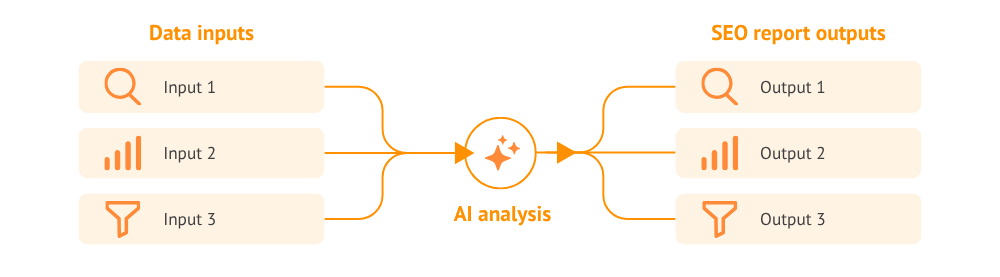
Six months later, Nia has a reliable process. She still has to remind the AI that one landing page generated valuable leads last quarter, another received a major update two months ago, and a third is already assigned to the content team.
Give AI access to:
Use a consistent name or ID for each page and recommendation. This helps the workflow match a performance change with related work and decisions.
Once the information is connected, the report can answer more useful questions:
A small decline on a page that drives leads may deserve more attention than a larger decline on an outdated article.
Prompt: Design a Connected SEO Reporting Workflow
Upload: Your data-source list, KPI glossary, content inventory, personas, previous reports, recommendation log, and business goals.
Act as a marketing intelligence specialist.
Design a connected reporting workflow for [COMPANY] that combines performance data, business goals and KPI definitions, marketing history, and previous decisions.
Show:
Return a connection plan and a 90-day setup schedule.
Nia’s workflow recommends updating a declining comparison page. Her team refreshes the examples, adds internal links, and improves the call to action.
Three months later, the page has gained qualified traffic and demo requests. Nia links the result to the original recommendation. That evidence can now influence how similar opportunities are ranked.
The workflow follows this sequence:
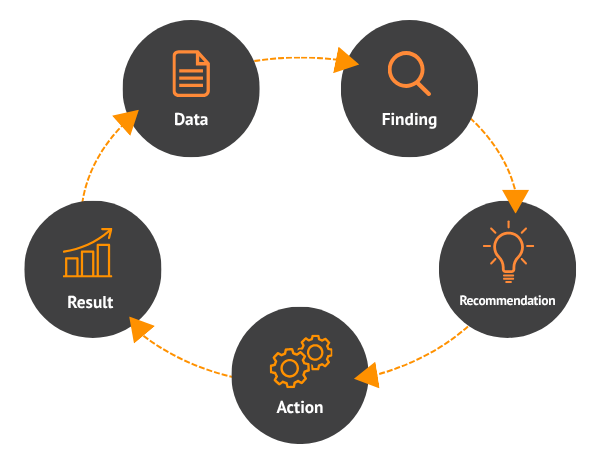
Create a tracking log.
Track each recommendation in a log, using the illustrative example below.
Review the log monthly or quarterly. Ask:
Prompt: Turn SEO Recommendations Into a Learning Workflow
Upload: Previous reports, recommendations, records of completed work, and performance data from after the work was completed.
You’re building a continuously-improving SEO reporting workflow for [COMPANY].
Match each recommendation with:
When the files contain enough information, calculate the percentage of recommendations completed, the percentage that achieved their goal, and the average impact.
Finish with the three next SEO actions most strongly supported by our previous results. Explain which outcomes informed each suggestion.
The prompts in this guide show how to build an AI reporting process one step at a time. Media Shower runs that process continuously using your company’s SEO performance, site behavior, conversion data, buyers, content history, and previous decisions.
Because our platform retains that knowledge, your team spends less time gathering files and restating goals. The platform tracks which recommendations the team completes, measures the results, and uses those outcomes to improve future advice.
Each reporting cycle adds evidence about what works for your company. For a format your workflow can produce every month, see the worked SEO report.
Start with Search Console, GA4 landing-page performance, and your most important conversion events. Together, they connect search visibility with visitor behavior and business results. Add rankings, backlinks, technical SEO data, and content history as the workflow develops.
Use monthly reports for leadership reviews and weekly summaries to help SEO and content teams spot changes sooner. Set more frequent alerts for tracking failures, indexing problems, and major traffic drops. When an alert fires, follow the organic traffic-drop investigation.
Yes, though you’ll have less evidence about lead quality or revenue impact. The report can assess search visibility, rankings, clicks, and landing-page traffic, but it should clearly separate those gains from business results.
A dashboard displays metrics and charts for exploration. An AI-generated report selects important changes, explains why they deserve attention, and recommends actions. Teams can use the dashboard to investigate details and the written report to guide decisions.
Follow your company’s policies before uploading analytics, customer, or revenue data. Confirm approved tools, project access, storage rules, and which sensitive fields to remove. Your organization may require controlled workspaces or approved direct connections.
You can test an AI-assisted report in one reporting cycle. A repeatable workflow takes additional setup to agree on inputs, KPI definitions, report sections, data checks, and approvals. Connected reporting develops as you accumulate history and results.
Start your free Media Shower trial and get personalized insights on your SEO, competitors, AI visibility, and what to do next.