The Better Marketing Blog
Better tips, tools, and tactics for the AI era.
Better tips, tools, and tactics for the AI era.
Marketers are increasingly relying on AI to speed up content production, but most tools stop at simple image generation. Nano Banana Pro goes further.
Powered by Google’s Gemini system, it can generate production-ready visuals with accurate data, crisp typography, and professional layout quality.
Dashboards, brand boards, timelines, flowcharts: this tool handles marketing materials that normally require a dedicated design team.
Here’s the ultimate guide to Nano Banana Pro for marketers.
Table of Contents:
The second version of Nano Banana can create finished marketing artifacts that other AI tools can’t touch. We’re talking dashboards with legible data, flowcharts with connected logic, and magazine layouts with professional typography.
The kind of deliverables that typically require specialized software and design expertise now happen in a single prompt.
NBP is a design engine, not just an image generator. It creates complete artifacts—technical schematics, timelines, infographics, and editorial spreads—that would normally demand hours in Photoshop or InDesign.
For marketers who need polished collateral without the production bottleneck, this tool changes how marketing work gets made.
Here’s what makes Nano Banana Pro different from other image generators.

Four things to know before you get started:
1. Access. The easiest way to access Nano Banana Pro is through Gemini 3. You can try it out with the free plan, but you will be limited to very few image generations per day.
2. Prompts. For simplicity’s sake, we’ve purposely used short prompts for a lot of our examples. To generate visuals that match your needs and brand guidelines, you’ll want to expand on simple requests with all of the details you want NBP to follow. NBP can handle more complex and multiple-step prompts than other AI image generators, so you can often get what you need with one shot.
3. Reference images. For many of the examples below, we generated images from scratch. But NBP’s real superpower is image editing. Whenever you can, give the AI a reference image to work from, then give instructions or request edits to get what you need.
For example, if you use a particular style of flat illustration, feed an example to the AI and ask it to follow that style as it generates your new visual. Edit to add or remove objects, reposition people, or merge images. Or change an image you like to match your brand colors.
4. Expect variation. Even with improved consistency of results, a single prompt will give a different output each time you use it. If you don’t like the first image but you’re happy with your prompt, simply run it again.
For more about the basics of editing images in Gemini/Nano Banana, check out our Marketer’s Guide to Nano Banana.
NBP handles 16 distinct marketing tasks, from executive briefs to 4K hero images. The examples below are organized by workflow: start with simple prompts, move to data-driven visuals and tasks using reference images for brand consistency, and finally tackle complex multi-element compositions.
Executive strategy briefs
Executives don’t have time for 150-page reports. They need the essential insights distilled into a single visual they can absorb in five minutes before a meeting.
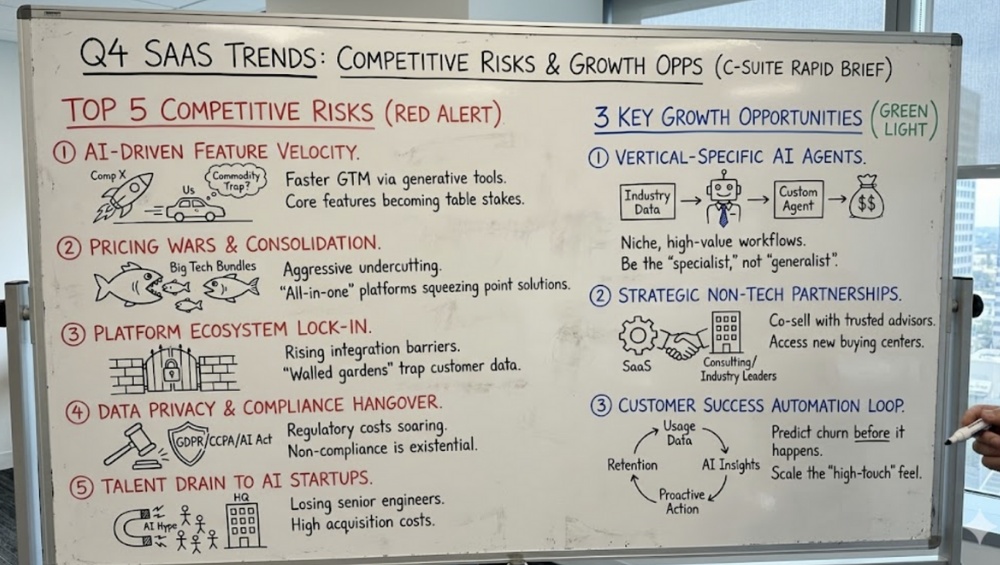
Nano Banana Pro creates whiteboard-style strategy briefs that summarize complex reports into hand-drawn diagrams highlighting key trends, risks, and opportunities. These visuals feel approachable while conveying strategic depth.
Sample prompt: Please convert this report to a concise whiteboard summary. [Upload the report]
Comprehensive brand style boards
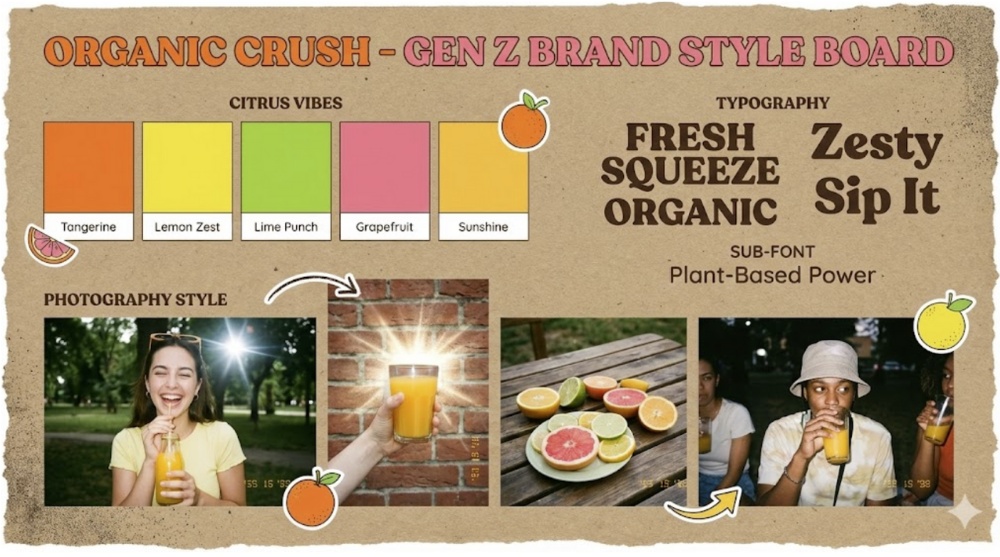
Nano Banana can also be a creative director, generating a single, cohesive brand board that defines the visual language in one shot. It combines color palettes (with hex codes), typography samples, photography styles, and textural elements into a polished one-pager that keeps stakeholders aligned from day one.
Sample prompt: Brand style board for an organic juice company targeting Gen Z. Include a color palette of vibrant citrus tones, chunky retro-serif typography samples, a gritty paper texture background, and a photography style that looks like high-flash film photography.
Infographics
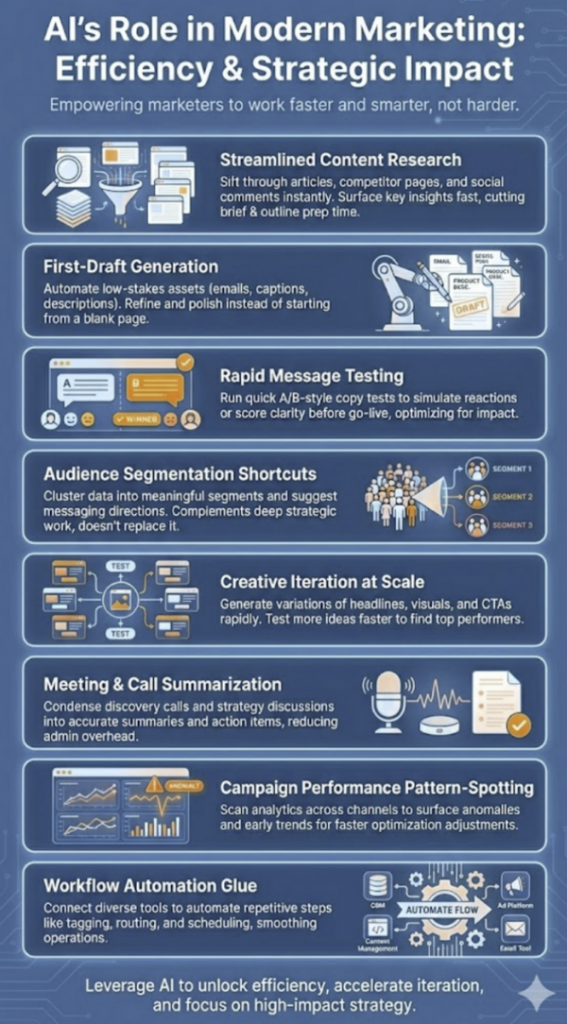
Nano Banana Pro is a wiz at infographics. In this example, we gave it a list of 8 AI use cases for content marketers and asked it to use our secondary brand colors to create an infographic.
Strategic comparisons
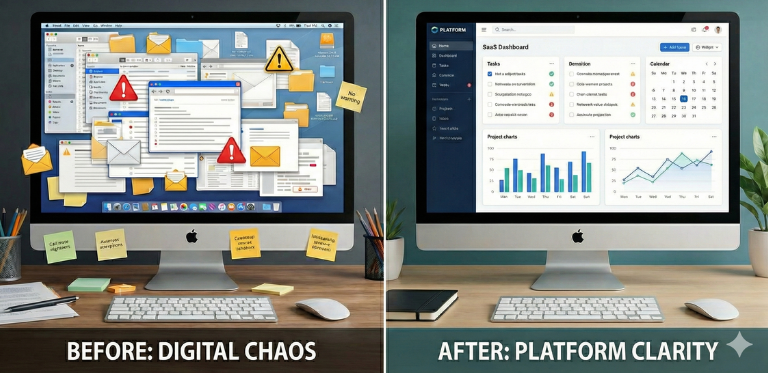
Before and after comparisons are marketing gold. NBP creates polished comparison graphics that clearly delineate differences through color, iconography, and spatial design.
These-versus-those visuals work for product comparisons, methodology contrasts, or any scenario where you need to show why your approach beats the alternative.
Sample prompt: Create a split-panel photorealistic before and after illustration for a SaaS productivity platform. The Before side should show a cluttered, chaotic digital workspace with overlapping windows, disorganized files, and warning icons. The After side should show a screen with a clean, organized dashboard with neatly aligned widgets and windows and clear charts.
You can even upload a screenshot of your own product to replace the generic image on the screen on the right, or replace the Apple logo on the monitor with your own. Just ask.
Accurate chart generation
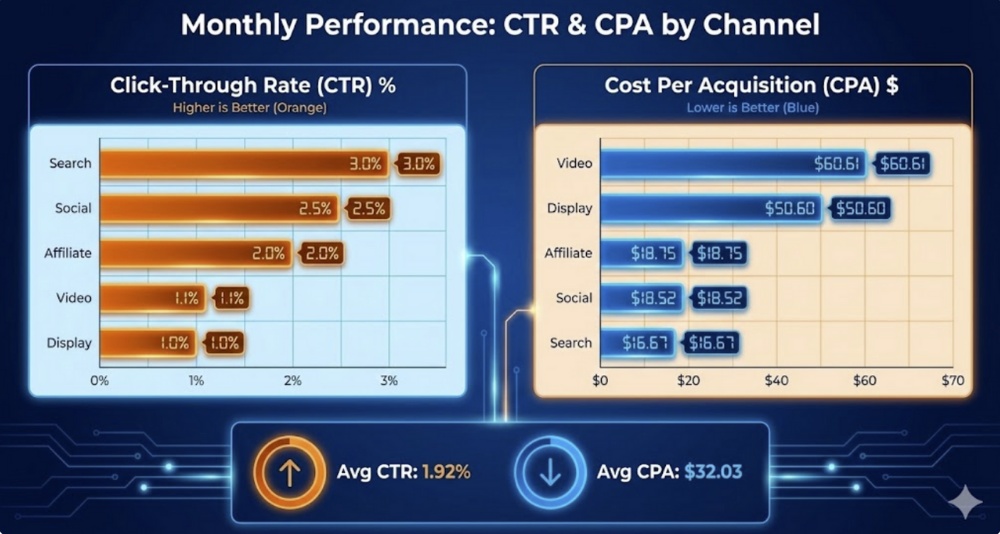
As another upgrade from version 1, the Pro model is now capable of generating accurate scale charts, correctly showing differences in magnitude, solving the long-standing problem where previous image generators failed to get the correct length for bars and columns.
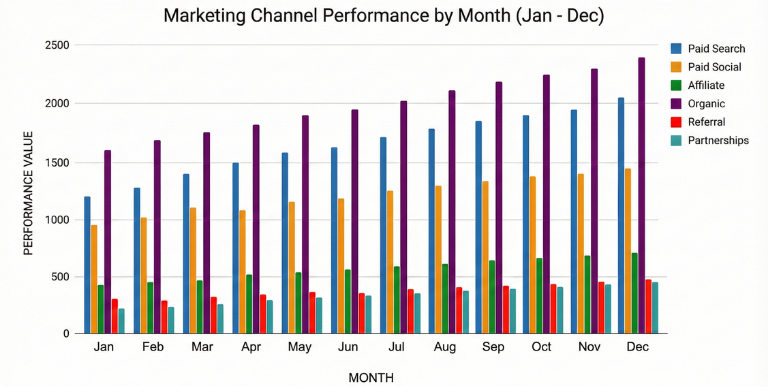
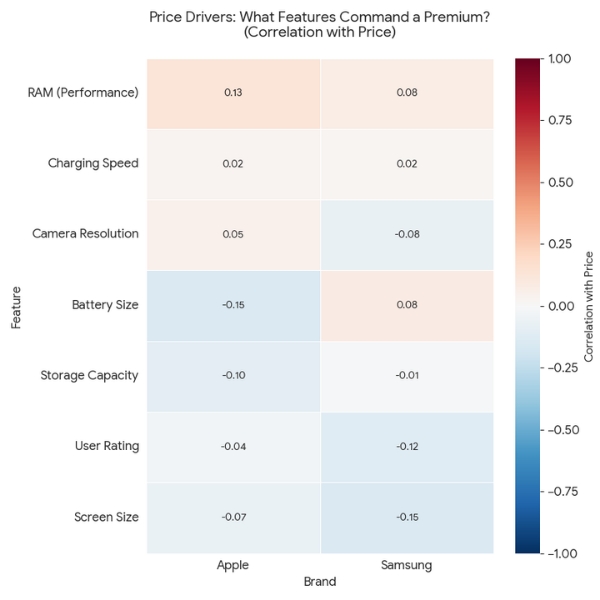
You can create many types of charts and graphs, including heat maps. These won’t always be perfect with the first shot, but they’re a major leap forward from version 1.
Instant data visualization
Turning spreadsheet data into client-ready dashboards usually requires expensive software and design skills. The back-and-forth between data analysts and designers creates delays when you need answers fast.
This tool converts raw data into scaled, accurate visualizations in your brand’s color palette. The result is dashboard-quality graphics that compress complex metrics into digestible charts without manual formatting.
Sample Prompt: Create a monthly performance dashboard from this spreadsheet, comparing CTR and CPA across five marketing channels. [Upload spreadsheet and brand guidelines]
Detailed maps
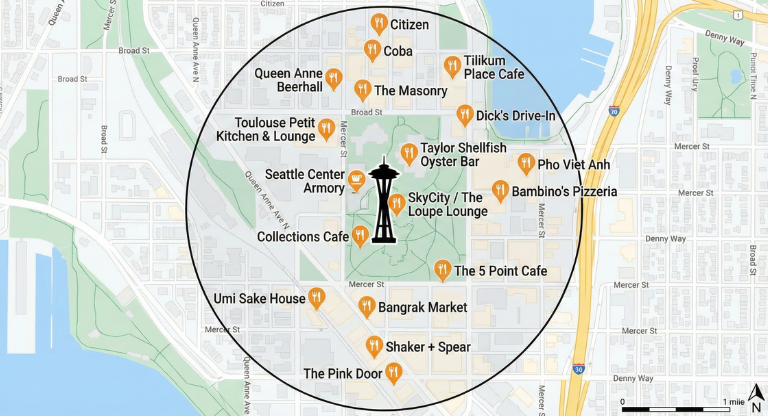
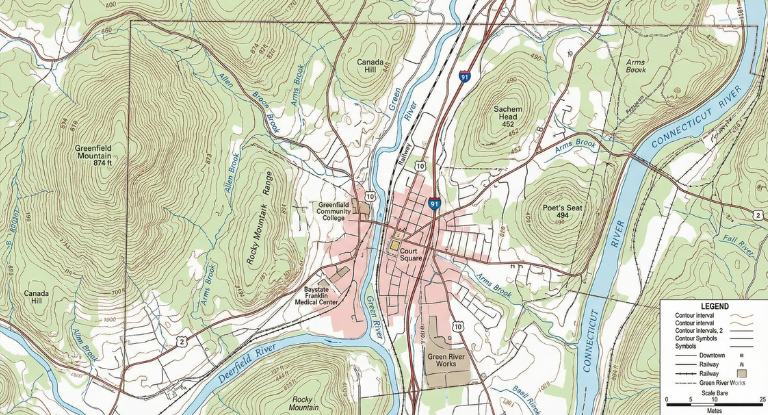
NBP is adept at creating many types of maps with remarkable accuracy. Here are a couple of examples.
Sample prompt: Create a map showing all of the restaurants in a 1-mile radius of the Space Needle in Seattle.
Timelines
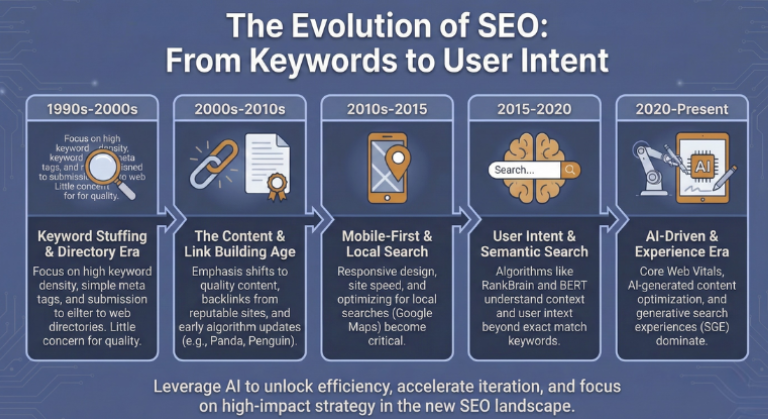
Timelines condense evolution into a single visual, but creating them manually means fighting with alignment, spacing, and visual hierarchy. Most design tools require tedious formatting to show progression clearly.
Nano Banana Pro generates horizontal timelines with distinct eras, progression markers, and proper chronological flow. Whether you’re illustrating the evolution of SEO or your company’s product roadmap, the tool handles layout complexity while keeping information scannable.
High-density infographics
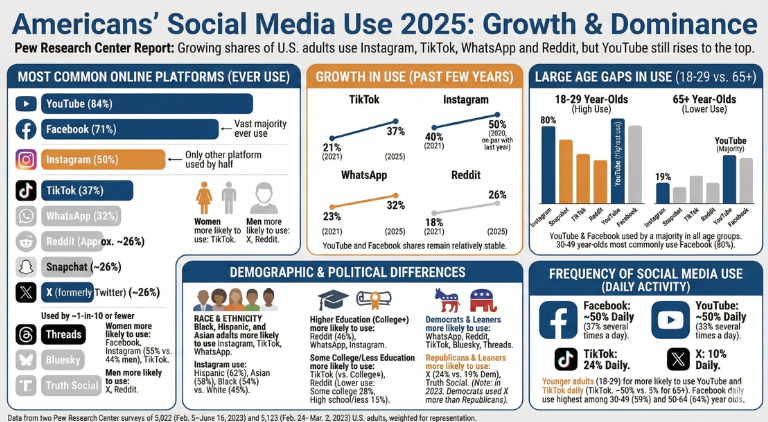
Research reports are valuable, but nobody reads 50-page PDFs. The challenge is condensing complex data into a single visual that communicates key findings at a glance.
Nano Banana Pro creates infographics that pack multiple data points into cohesive layouts that are easier to parse. These report summaries transform dense statistics into scannable graphics that actually get looked at in meetings.
Sample prompt: Analyze this report and create an infographic that covers all the major points. [Upload the report]
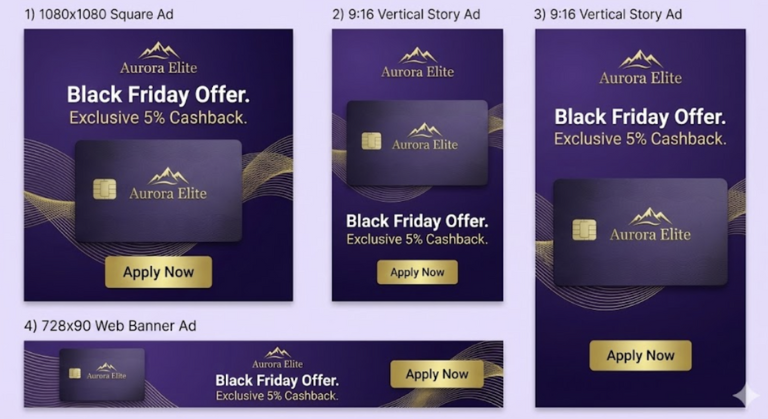
Multi-format display ad sets
NBP is a great versioning tool. It understands that the relationship between elements changes with the aspect ratio. It intelligently rearranges the headline, product shot, and CTA button to fit the constraints of each format while maintaining the master brand style. And it gets them all with a single prompt.
Sample prompt: Set of 3 display ads for healthcare practice management software. Generate: one 1080×1080 square, one 9:16 vertical story, and one 728×90 web banner. Color scheme teal green, gray, white, and navy blue. All must feature a Dashboard product screenshot with the product name HealthChart — and the heading Black Friday Sale 40% off. Add a ‘Shop Now’ button in a complementary color.
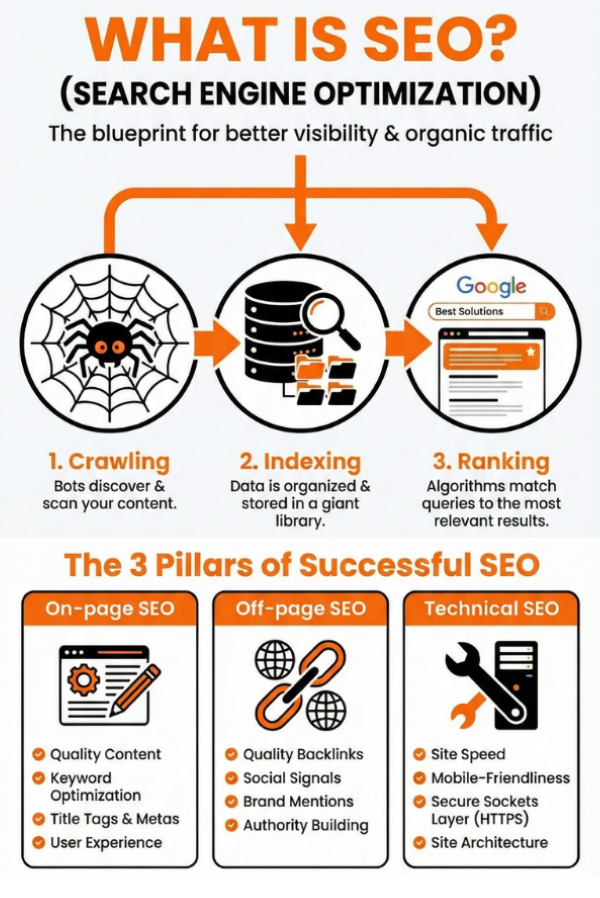
From video to visual
Nano Banana Pro converts video transcripts into visual summaries. Feed it a transcript (or even a video’s URL) and it generates infographics, diagrams, or illustrated summaries that capture key points without requiring viewers to watch or read lengthy content.
Sample prompt: Please convert this video to an infographic in brand colors: https://www.youtube.com/watch?v=82QMDaaOYSI. Capture all of the main points.
Photorealistic visualization
Use this when you need to change an abstract or fanciful image into a realistic version.
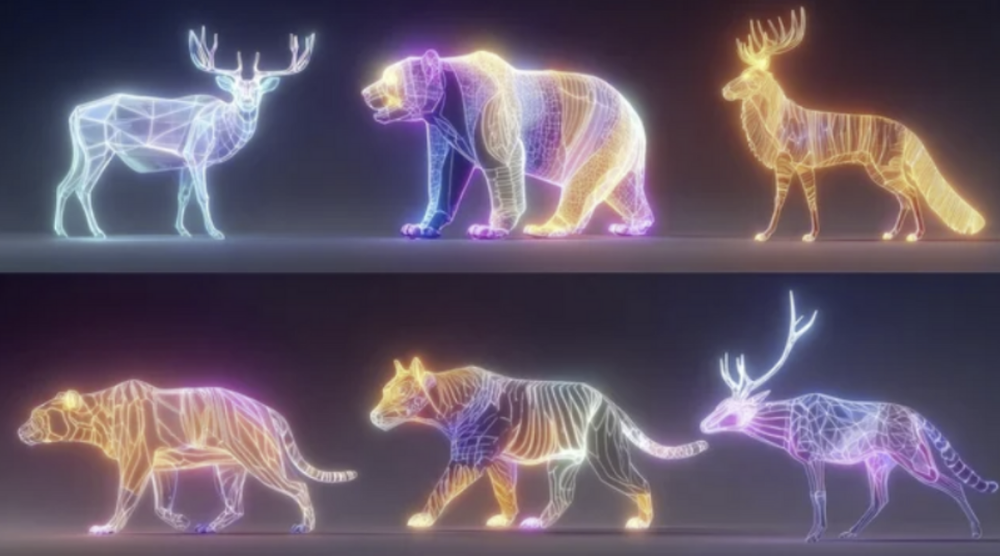
Sample prompt: Change this image to show realistic animals in a jungle environment.
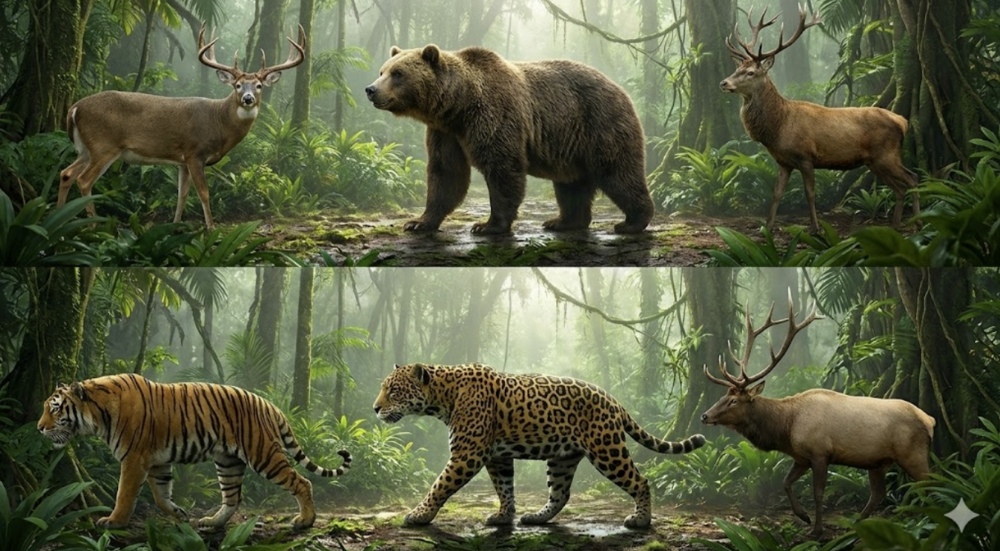
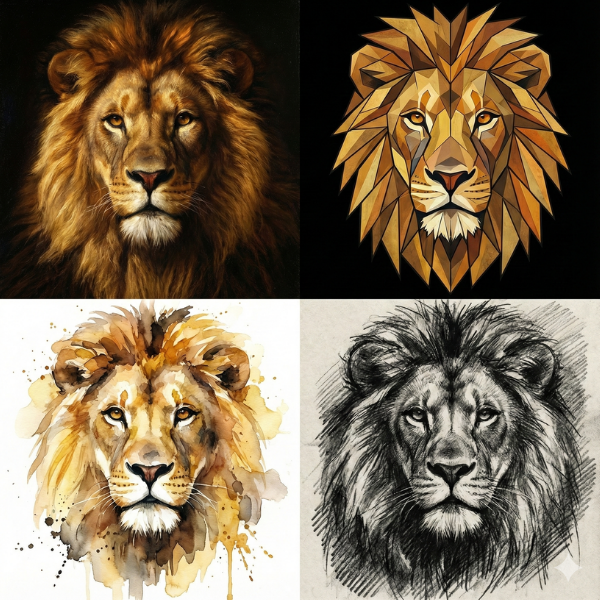
Or to recreate an image in any art style with perfect consistency of detail:
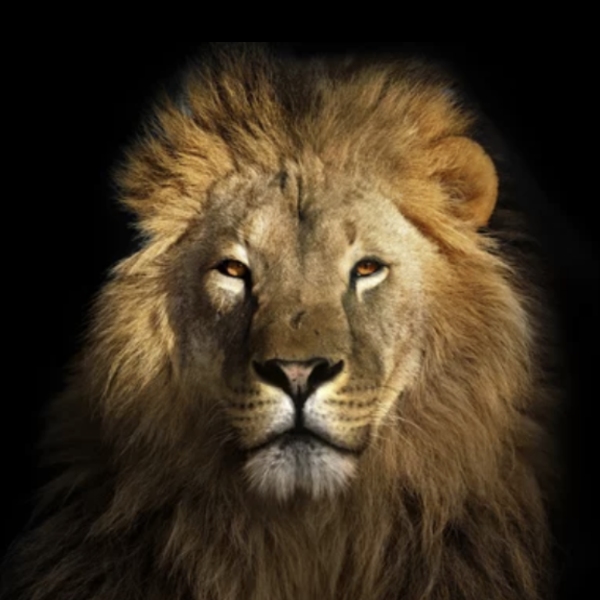
Sample prompt: Recreate this lion into three different art forms. Output all four in a 2 x 2 grid.
Slide decks
Nano Banana Pro might just be the cure to Death by PowerPoint. It treats a presentation as a single design system. It can generate distinct slide types—title, bulleted list, big data, and conclusion—that share identical branding, typography, and spatial logic.
You get a boardroom-ready deck foundation in seconds, not hours.
Sample prompt: Corporate pitch deck for a cybersecurity firm, dark mode theme with neon blue accents, futuristic feel. Include four slides: Title slide, ‘The Problem’ bulleted list, ‘Market Growth’ bar chart, and ‘Our Solution’ diagram.
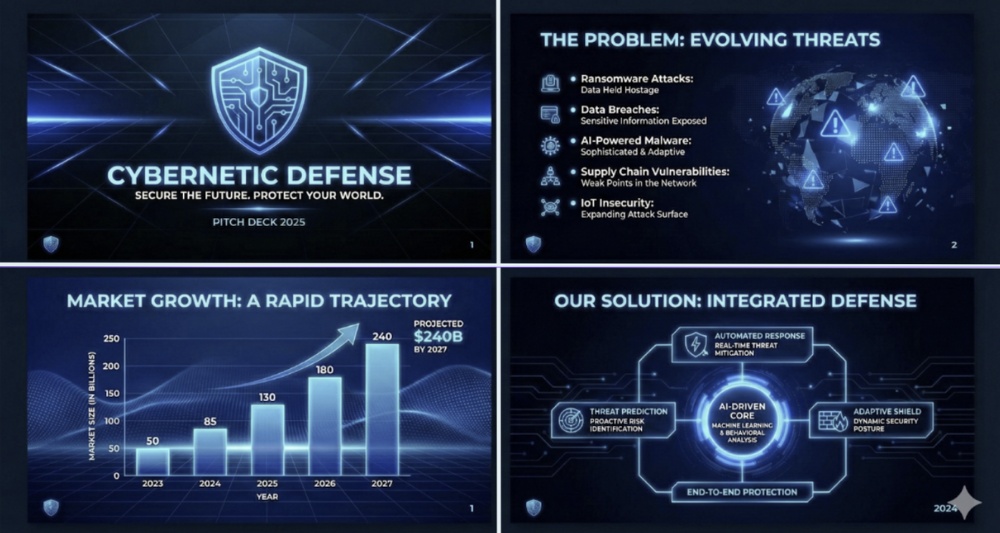
Alternatively, you can upload a report and NBP can create the prompt for you.
Seamless social carousels
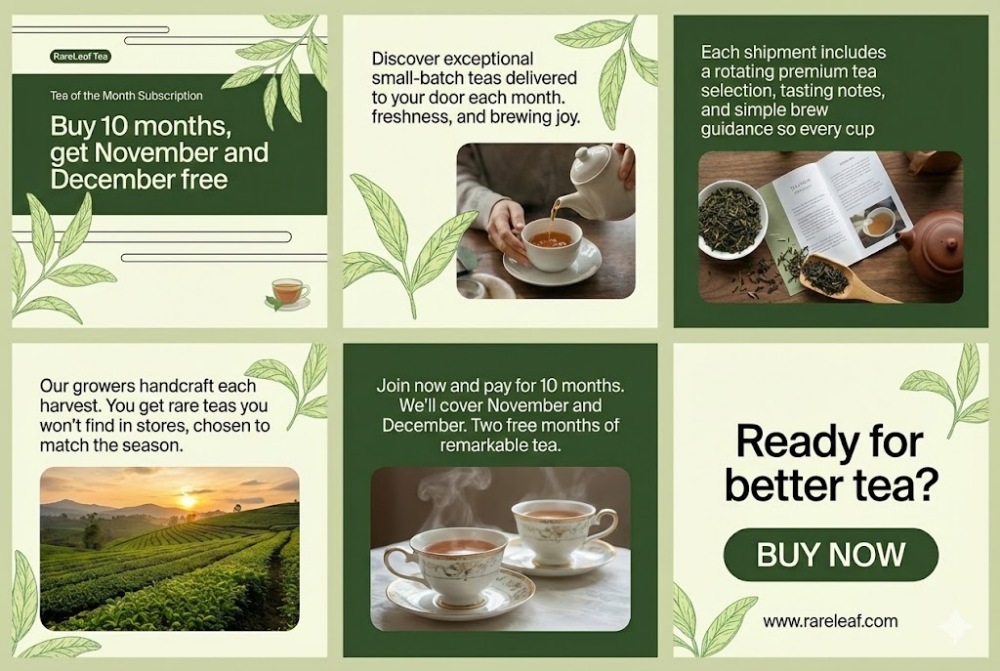
LinkedIn PDF sliders and Instagram carousels are currently the highest-performing organic social formats. NBP’s batch processing capabilities let you create all the slides with a single prompt.
Sample prompt: 6-slide LinkedIn carousel, in a 3×2 grid. Use the uploaded sample image as a guide to style and colors. Script: [upload script]
Complex logic and decision trees
Flowcharts explain processes, but they’re usually boring. The challenge is creating diagrams that are both informative and visually engaging—something that captures attention while accurately mapping complex decision paths.
NBP handles everything from standard business flowcharts to deliberately elaborate diagrams with personality. Text remains crisp and legible even in intricate layouts, and you can adjust the visual style from corporate-serious to delightfully absurd depending on your audience.
Here’s one we created just for fun.
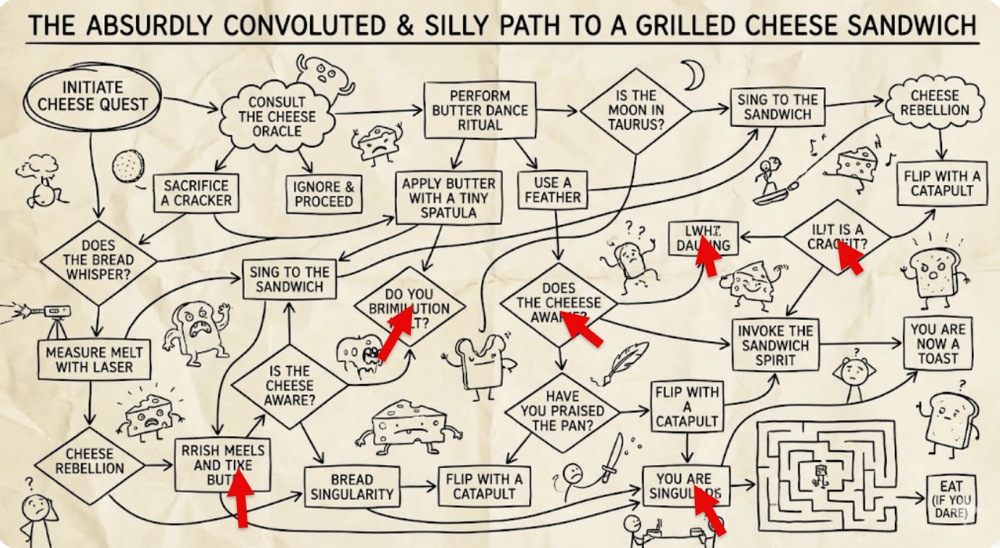
Note that in a design this text-heavy, you will likely have some text errors; NBP still isn’t perfect. But errors are easier to fix. Just describe or annotate the errors and ask the AI to correct the misspellings. It will usually get it right with one iteration.
High-fidelity editorial layouts
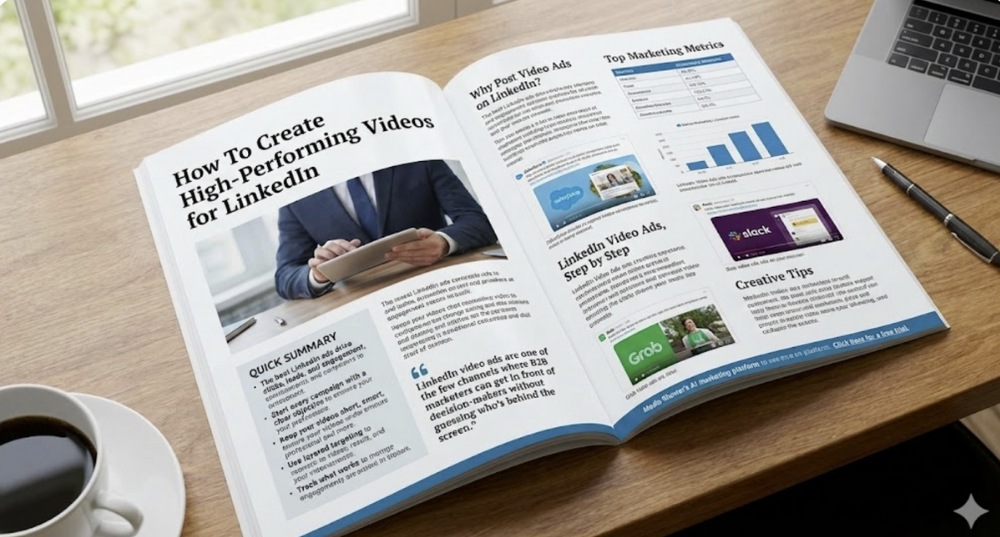
Magazine-quality spreads require mastery of typography, alignment, and visual hierarchy. Creating these layouts manually in InDesign takes hours and requires specialized skills most marketers don’t have.
NBP’s layout engine can handle headers, pull quotes, body text, and image placement in a single generation. You get publication-ready spreads that look professionally typeset without touching design software.
Sample prompt: A high-fidelity editorial photograph of an open, glossy magazine spread resting on a wooden desk, using this text. [Upload text] Use masterful typography, precise alignment, pull quotes, and a clear visual hierarchy so it looks professionally typeset.
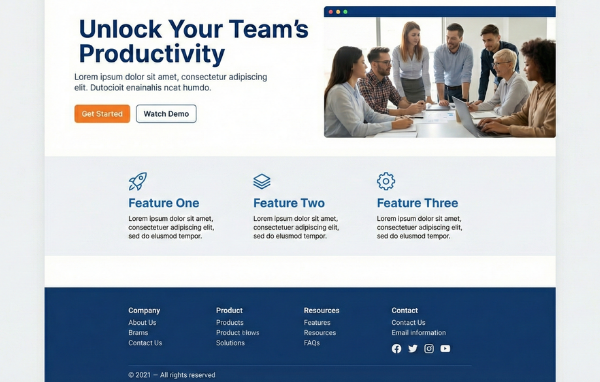
Rapid UI wireframing
Nano Banana Pro bridges the gap between idea and implementation by generating high-fidelity wireframes. It understands web conventions—navigation bars, hero sections, CTA placement, and pricing tables—allowing you to hand off a visual reference that clearly communicates structure and hierarchy without needing to code.
Sample prompt: High-converting SaaS landing page wireframe. Hero section with headline and image on right, followed by a three-column feature section, and a pricing table with a ‘Most Popular’ toggle. Clean, modern UI style.
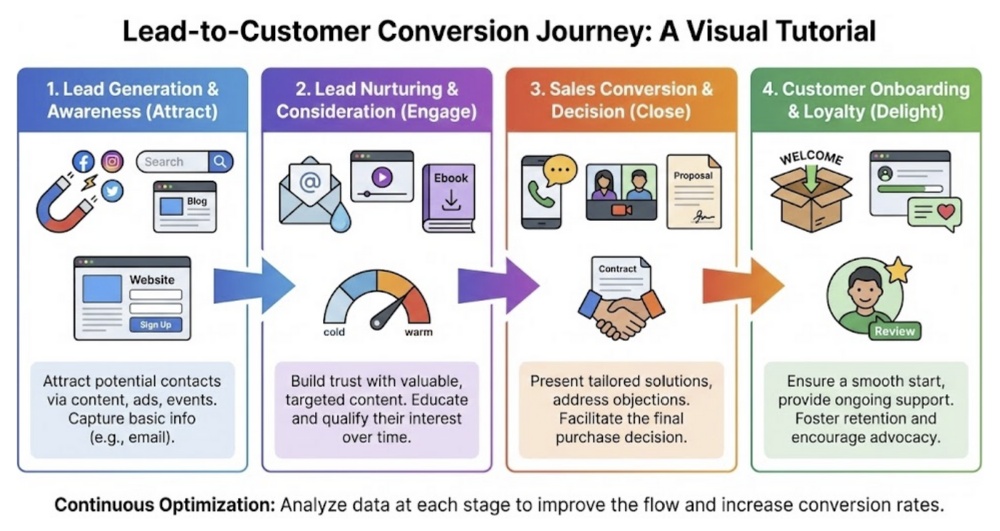
Process maps and customer journeys
Stakeholders need to understand complex workflows quickly, but dense process maps often confuse more than clarify. The key is balancing comprehensiveness with visual simplicity.
The tool generates clean process flows with modern iconography and intuitive step-by-step progression. Whether you’re mapping a customer journey or an internal approval process, the output looks polished enough for client presentations.
Sample prompt: Create a visual tutorial chart of how a lead becomes a customer.
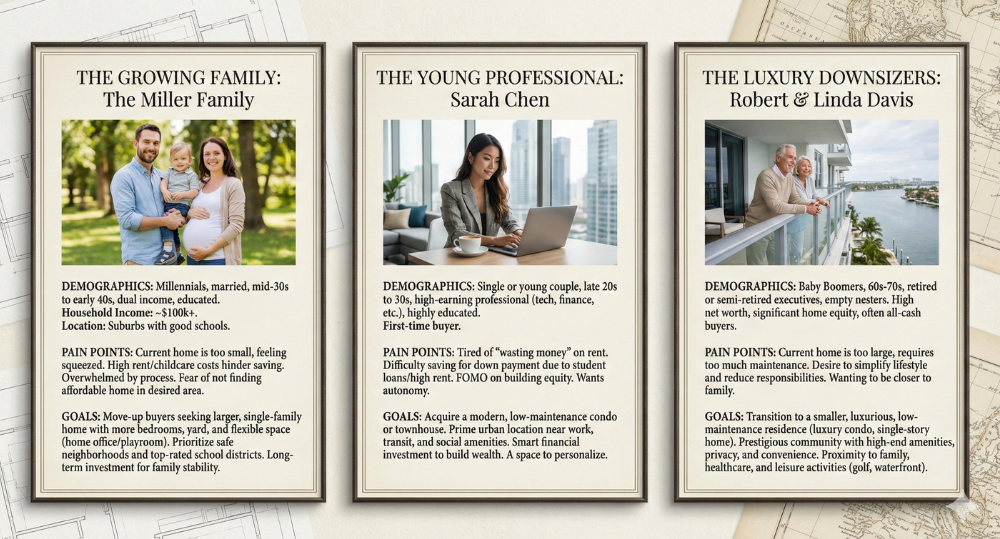
Persona profiles and market segmentation
Nano Banana is perfect for this task because it not only excels at image generation, but it has the power of Gemini 3 behind it, meaning it will do the research for you, as well.
Sample prompt: Create three typical personas for a real estate company: The Growing Family, The Young Professional, and The Luxury Downsizers. Create Name & Demographics, Pain Points, and Goals for each. Output as a single 3-panel image with a classic design suitable for a realtor.
System explainer graphics
Abstract concepts like software architecture or cybersecurity protocols are hard to visualize. Stakeholders need to see how invisible systems work, but most diagrams are either too simplistic or incomprehensibly technical.
Nano Banana Pro produces explainer graphics that make abstract processes tangible. With options for neon-cyber aesthetics or clean corporate styles, these visuals bridge the gap between technical accuracy and stakeholder comprehension.
Sample prompt: Create a step-by-step explainer graphic for a cybersecurity company titled How Real-Time Threat Detection Works. Use bright blues and greens.

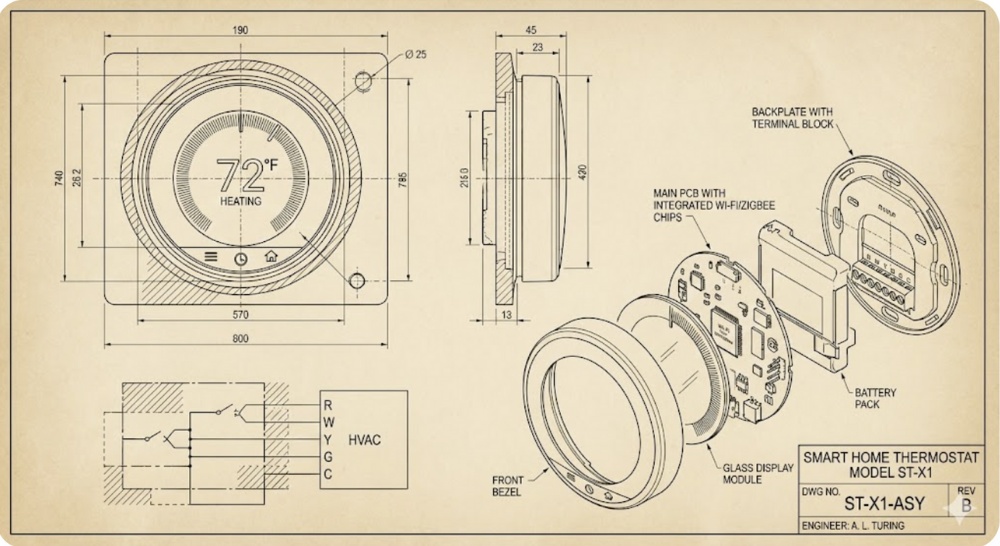
Technical schematics and blueprints
Traditional AI tools struggle with the technical accuracy and aesthetic technical companies expect. Nano Banana Pro produces CAD-style renderings with dimensions, exploded views, and blueprint aesthetics.
These technical drawings carry the authority of professional engineering documentation while remaining accessible to non-technical stakeholders.
Sample prompt: Please create a technical drawing of a smart home thermostat.
3D images with perfect accuracy
Sample prompt: Create a single image showing this product from four views: Front, back, left side, and right side.
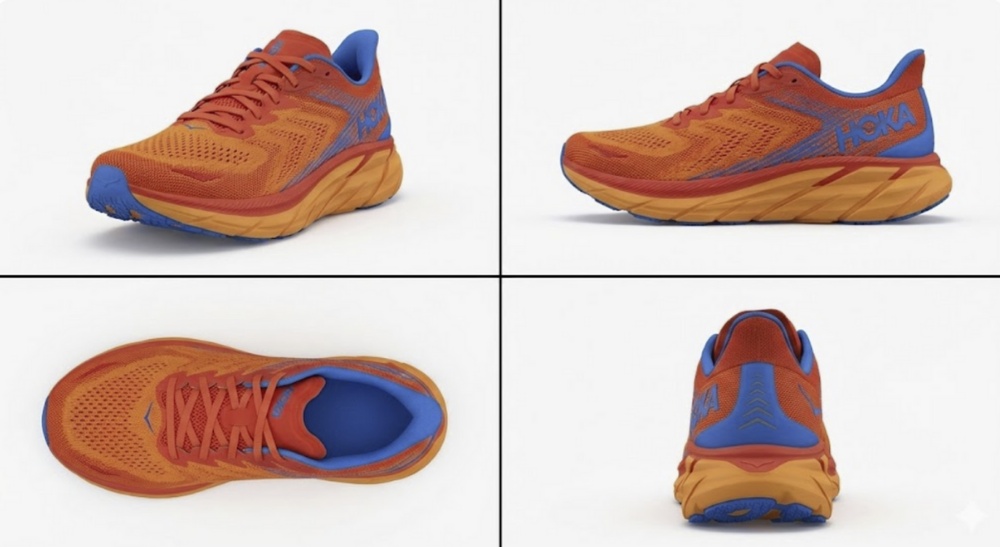
NBP will typically keep all of the details intact as it changes perspectives.
Think big
You can also use this feature to create a 3D model of your home with realistic (though likely not perfect) measurements.
Sample prompt: Create a 3D model of this house and add estimated exterior measurements.
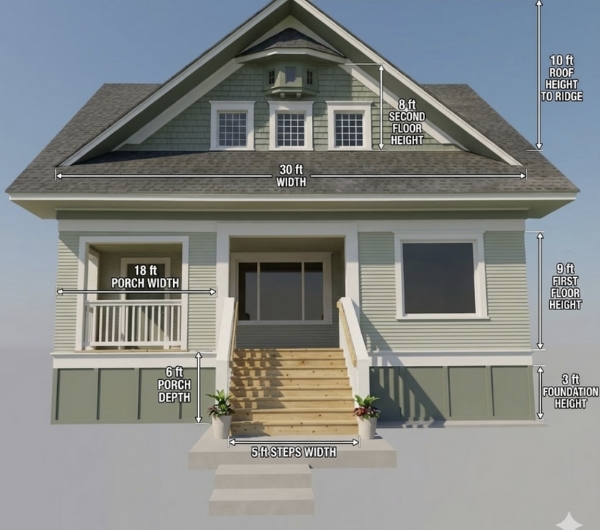
The details remain consistent from every view, and the measurements are all typical for a Craftsman-style bungalow.
Visual storytelling with comic strips
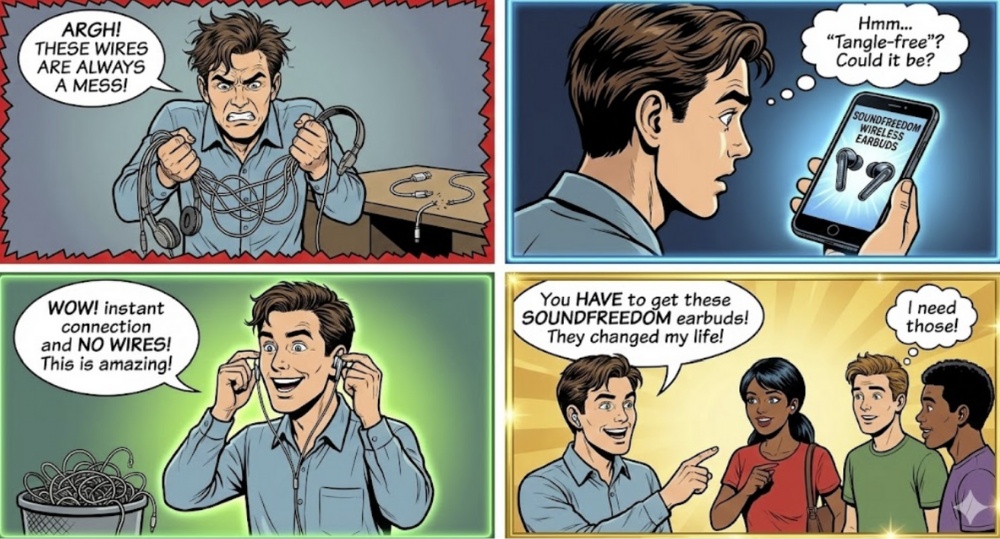
With much improved character consistency, users can now generate multi-frame comics with recurring characters and coherent visual storytelling. The tool maintains character design across panels while advancing the plot, giving you brand-friendly comics without hiring an illustrator.
Sample Prompt: Create a four-panel comic strip in a pop art style, ensuring the main male character’s appearance remains consistent.
Video storyboards
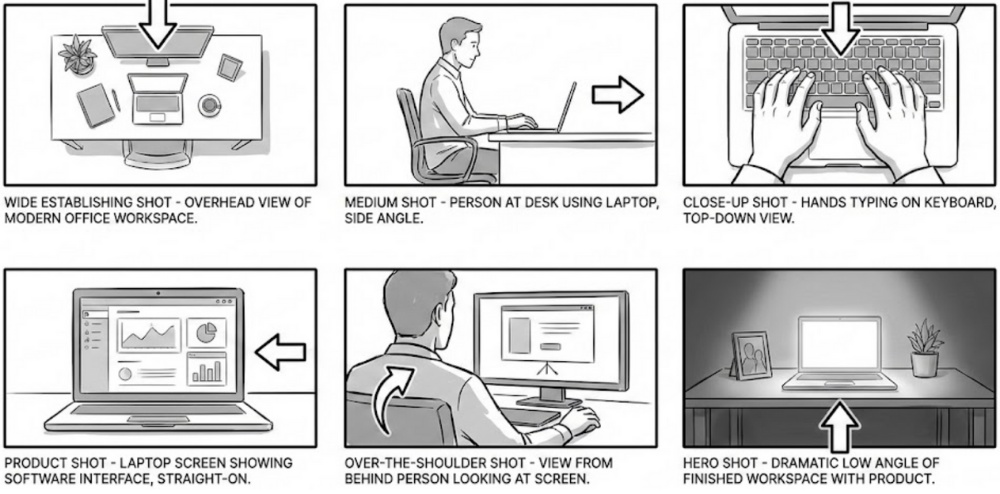
Sample Prompt: Map out video concepts frame by frame before production. NBP generates visual sequences that show camera angles, scene composition, and action progression, giving Create a professional video production storyboard with 6 panels arranged in a 2×3 grid. Each panel should show a different camera shot/angle for filming a product demo video:
Panel 1: Wide establishing shot – overhead view of modern office workspace
Panel 2: Medium shot – person at desk using laptop, side angle
Panel 3: Close-up shot – hands typing on keyboard, top-down view
Panel 4: Product shot – laptop screen showing software interface, straight-on
Panel 5: Over-the-shoulder shot – view from behind person looking at screen
Panel 6: Hero shot – dramatic low angle of finished workspace with product
Each panel should include: a simple sketch/illustration style showing the scene composition, camera angle indicator (arrows or labels), and brief shot description text below. Use a clean storyboard template aesthetic with frames and labels.Black and white or minimal color.
Cinematic ads and hero images
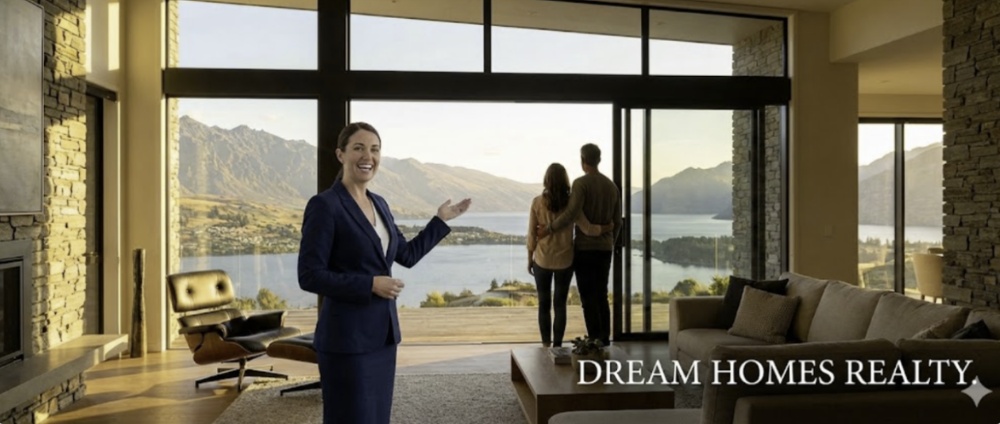
As mentioned above, Gemini can generate images up to an impressive 4K. To get the most of this capability, we need a more complex prompt. We described what we wanted to Gemini and then asked it to write the prompt.
Here’s what it came up with, along with the output.
Sample prompt: A sweeping, wide-angle landscape photograph serving as a cinematic advertisement for a luxury real estate agent. The image captures a pivotal moment of realizing a dream.
The scene: Inside the expansive, modern living room of an architectural masterpiece perched on a hillside. One entire wall is floor-to-ceiling glass, overlooking a dramatic mountain range and a lake during golden hour.
The subjects: A confident, impeccably dressed female realtor in a tailored suit stands slightly to the side, smiling warmly as she gestures towards the view with an open hand. Beside her, a couple (clients) stands silhouetted against the massive window, looking out in awe, the man’s arm around the woman’s shoulders. They are enveloped in the warm, golden light.
The photography style: Shot on medium format film (like Kodak Portra 400), with visible fine grain and rich, warm color grading. The sunlight streams directly into the lens, creating a subtle, artistic lens flare. The depth of field is shallow, keeping the subjects sharp while rendering the distant mountains into a soft, painterly bokeh. The composition is balanced and aspirational, conveying trust, success, and a bright future. The bottom corner has space for an elegant logo overlay.
So just how good is Nana Banana Pro? If we haven’t convinced you yet, take a look at the comparison table below to see how it stacks up with the leading competitors.
Despite recent advancements, Nano Banana Pro still has significant limitations.
You can access Nano Banana Pro through the Gemini app—open the image-generation tools, select the Thinking model, and open the Tools dropdown. For integration or automation, developers and advanced users can use Google’s AI Studio or Vertex AI to embed a production-workflow version.
Pricing
Here’s a sample breakdown of current pricing tiers for Nano Banana Pro:
Free Tier: $0/month. Includes 2 credits per day, unlimited premium features, fast-generation queue, 100-day image history, private generations, and commercial rights.
Basic Plan: $15/month (or $11.90/month if billed annually = $142.80/year). Includes 300 credits/month and all premium features.
Pro Plan: $26.90/month (or $18.90/month if billed annually = $226.80/year). Includes 800 credits/month and full feature access.
Pro Max Plan: $49.90/month (or $39.90/month annually = $478.80/year). Includes 2,000 credits/month and highest packing of credits.
If you’re not sure which tier you’ll need, you can start with the free tier to test Nano Banana Pro, then move to a paid tier once you need higher credits, faster speed, or commercial-scale use.
The Bottom Line
We have only scratched the surface on the marketing tasks Nano Banana Pro can handle. It collapses the traditional workflow from concept to finished artifact. Instead of moving through multiple rounds of drafts, designer handoffs, and revisions, you go from idea to polished deliverable, often with a single prompt.
For marketers who need professional collateral without professional designers, that’s a genuine shift in how work gets done.
NBP generates production-ready marketing assets in one prompt—no designer handoffs or multiple revision rounds.
Media Shower’s AI marketing platform helps you create campaigns that are just bananas. Click here for a free trial.